Virtualization security in cloud computing: A comprehensive guide

When you move your workloads to the cloud, you're not just changing where your systems run; you're also changing how they operate. You're fundamentally altering how they're architected, secured and managed. Virtualization forms the backbone of cloud computing, yet many organizations treat virtualization security in cloud computing as an afterthought. That approach leaves critical gaps in your defenses.
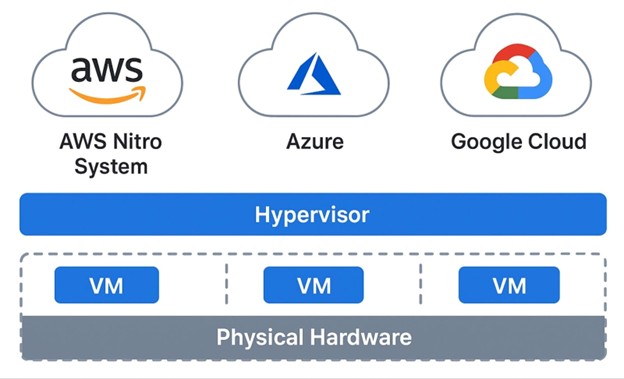
Today's cloud environments rely on virtualization to deliver the agility and scalability that make cloud computing a compelling option. Amazon Web Services runs on the Nitro System, Microsoft Azure uses its own hypervisor and Google Cloud Platform leverages KVM. Each brings unique security considerations that extend well beyond traditional data center practices.
The stakes are high. A compromised hypervisor can expose every virtual machine it hosts. A misconfigured VM can serve as a lateral movement vector for attackers. Side-channel attacks can leak data between supposedly isolated tenants. Getting virtualization security right in the cloud requires understanding both the technology and the shared responsibility model that governs it.
Ready to strengthen your cloud skills? Sign up for Infosec's free AWS cloud workshop to get hands-on experience with AWS security fundamentals and cloud virtualization security best practices.
Table of Contents:
- Understanding virtualization in modern cloud environments
- Cloud provider virtualization security
- Virtualization threats and attack vectors
- Hypervisor security best practices
- VM security hardening
- Containers versus VMs security comparison
- Monitoring and detection
- Compliance and cloud virtualization
- Future of virtualization security
- Hands-on practice with CloudGoat
- Conclusion
Understanding virtualization in modern cloud environments
Virtualization technology allows multiple operating systems to run concurrently on a single physical machine. Each virtual machine operates in isolation, sharing the underlying hardware resources through a hypervisor layer. This architecture enables cloud providers to maximize resource utilization while maintaining security boundaries between different customers' workloads.
The evolution from traditional datacenter virtualization to cloud-native implementations has introduced new complexity. When you ran VMware ESXi in your own datacenter, you controlled every layer of the stack. In the cloud, you share responsibility with your provider. They secure the hypervisor and physical infrastructure. You secure your guest operating systems, applications and data.
This shared responsibility model creates unique challenges. You can't patch the hypervisor yourself. You can't physically inspect the hardware. You must trust your cloud provider's security practices while remaining accountable for protecting your own workloads. Understanding where your responsibilities begin and end is the first step toward adequate virtualization security in cloud computing.
Earn your CMMC certification
Register for a boot camp and become a Certified CMMC Professional (CCP) or Assessor (CCA)!
Hypervisor architecture and types
The hypervisor sits at the heart of virtualization security in cloud computing. Type 1 hypervisors run directly on hardware, offering better performance and security compared to Type 2 hypervisors, which operate on top of a host operating system. All major cloud providers use Type 1 architectures for production workloads.
AWS's Nitro System represents a modern approach to hypervisor design. Rather than running a general-purpose hypervisor, Nitro offloads virtualization functions to dedicated hardware and firmware. This reduces the attack surface dramatically compared to traditional software hypervisors. The Nitro Hypervisor is a minimal component built on the KVM foundation, focusing solely on memory and CPU isolation.
Azure runs on its own custom hypervisor, evolved from Hyper-V but heavily modified for cloud scale. Microsoft's hypervisor utilizes Windows-based management while maintaining a minimal footprint in production environments. Azure's security architecture includes hardware-based attestation and encryption capabilities built into the virtualization layer.
Google Cloud Platform uses KVM (Kernel-based Virtual Machine) as its foundational hypervisor technology. GCP wraps KVM with additional security controls and custom management tools. The architecture emphasizes defense in depth, with multiple layers of isolation between tenant workloads.
Security benefits of virtualization
Virtualization brings genuine security advantages when implemented correctly. Isolation represents the most fundamental benefit. Each VM operates in its own protected memory space, preventing direct interference between workloads. This containment limits the blast radius in the event of breaches.
Snapshot capabilities provide security teams with powerful forensic and recovery tools. When a security incident occurs, you can capture the exact state of a compromised VM for analysis without disrupting production. You can also roll back to known-good states, accelerating recovery from ransomware and other destructive attacks.
Resource controls let you prevent denial-of-service attacks between tenants. Cloud providers enforce CPU, memory and I/O limits at the hypervisor level, ensuring that one customer's runaway process can't starve others of resources. This protection operates below the guest OS, making it tamper-resistant.
Centralized management simplifies security operations at scale. Instead of physically accessing hundreds of servers to apply patches or configuration changes, administrators with cloud administrator skills can manage entire fleets of VMs through API calls. These capabilities enable sophisticated cloud security implementations that would be impractical in traditional datacenter environments.
Hardware reduction minimizes physical security risks. Ten VMs running on one physical server present a smaller physical attack surface than ten discrete machines. Fewer servers mean fewer opportunities for physical tampering, theft or unauthorized access to facilities.
Security challenges introduced by virtualization
The same technology that enables cloud computing also creates new avenues for attack. VM sprawl occurs when teams spin up instances without proper inventory and decommissioning procedures in place. Each forgotten VM represents a potential security gap, often running outdated software with known vulnerabilities.
The hypervisor becomes a single point of failure. A successful exploit at this layer compromises every VM on the host. While hypervisor vulnerabilities are rare, their impact is catastrophic. The 2015 VENOM vulnerability demonstrated this risk, affecting multiple virtualization platforms across the industry.
Inter-VM attacks exploit shared resources to leak information or disrupt operations. Side-channel attacks use timing analysis of CPU caches, memory access patterns or other shared resources to extract cryptographic keys or other sensitive data from neighboring VMs. Virtual machine escape attacks like Spectre and Meltdown attacks showed that even sophisticated isolation mechanisms can fail against determined adversaries.
Network complexity increases dramatically in virtualized environments. Traditional network security tools can't inspect traffic that never leaves the physical host. Virtual switches, network overlays and software-defined networking add layers that require new monitoring and security approaches. Organizations implementing virtual DMZ architecture in cloud environments must understand how virtualization affects network segmentation.
Snapshot and image security often get overlooked. VM snapshots contain the complete system state, including sensitive data such as passwords, cryptographic keys and customer information. Improperly secured snapshots can leak sensitive data or allow attackers to compromise your environment offline.
Cloud provider virtualization security
AWS EC2 security architecture
Amazon's Nitro System represents a fundamental rethinking of cloud virtualization security. By moving hypervisor functions to dedicated hardware and firmware, AWS significantly reduces the software attack surface. The Nitro Hypervisor handles only memory and CPU virtualization, with networking, storage and management offloaded to Nitro Cards.
This architecture provides strong isolation between customer instances. The Nitro Security Chip performs hardware-verified boot, ensuring that only authentic AWS firmware loads. It also locks down management functions, preventing even AWS administrators from accessing customer instances directly.
EC2 instances run on either the Nitro System or the older Xen-based virtualization. Newer instance types leverage Nitro exclusively. The Nitro architecture enables features such as automatic encryption of data in transit between instances and underlying storage volumes, implemented in hardware for enhanced performance and security.
Instance Metadata Service version 2 (IMDSv2) addresses a common attack vector. The original IMDS v1 responded to any HTTP GET request, making it vulnerable to server-side request forgery (SSRF) attacks. IMDSv2 requires a signed session token, which can be obtained through a PUT request with a specific header. This change blocks most SSRF-based credential theft attempts.
{
"Version": "2012-10-17",
"Statement": [{
"Effect": "Allow", "Principal": {"Service": "ec2.amazonaws.com"}, "Action": "sts:AssumeRole"
}]
}
EBS encryption protects data at rest with AES-256 encryption. When you enable EBS encryption, AWS encrypts data before writing it to storage and decrypts it when reading. The encryption keys are managed by AWS Key Management Service (KMS), with options for customer-managed keys (CMK) that provide additional control.
Security Groups function as stateful firewalls at the hypervisor level. These operate before traffic reaches your instance, providing defense-in-depth. Rules specify allowed traffic by protocol, port and source/destination. The default deny-all posture means you explicitly permit only necessary communications.
Azure Virtual Machines security
Microsoft Azure's hypervisor has evolved from Hyper-V into a cloud-optimized virtualization platform. The Azure hypervisor runs a minimal Windows-based management layer with a hardened kernel. Microsoft's security development lifecycle applies to hypervisor code, with extensive testing and third-party audits.
Shielded VMs provide enhanced security through virtual TPM (vTPM), Secure Boot and measured boot capabilities. These features protect against rootkits and boot-level malware. The vTPM enables BitLocker drive encryption and attestation, verifying that your VM boots with only trusted components.
Azure Disk Encryption uses BitLocker for Windows and dm-crypt for Linux to encrypt OS and data disks. Keys are stored in Azure Key Vault, integrated with Azure Active Directory for access control. This encryption happens at the VM level, distinct from Azure Storage Service Encryption, which operates at the storage platform level.
Network Security Groups (NSGs) filter traffic to and from Azure resources. Like AWS Security Groups, NSGs operate at the network layer, but they function as stateless filters. NSG rules are evaluated independently for both inbound and outbound traffic, requiring explicit rules for each direction.
Azure Security Center provides unified security management for VMs. It assesses your VMs against security best practices, identifies vulnerabilities and recommends remediation steps. Integration with Microsoft Defender includes threat detection and response capabilities across your virtualized infrastructure.
GCP Compute Engine security
Google Cloud Platform relies on KVM for its virtualization, offering extensive customization options. Google's infrastructure uses a custom Linux kernel with additional security features. The boot stack includes verified boot using cryptographic signatures, ensuring that only Google-signed code executes on physical servers.
Shielded VMs on GCP leverage virtual Trusted Platform Module (vTPM) and UEFI firmware to verify boot integrity. These VMs measure every component loaded during boot and store the measurements in the vTPM. Google Cloud can attest to this integrity, proving that your VM runs unmodified software.
Persistent disk encryption is mandatory in GCP. All data written to disk is encrypted automatically using AES-256 before leaving the instance. Google manages encryption keys by default, but customer-supplied encryption keys (CSEK) or Cloud KMS-managed keys provide additional control for sensitive workloads.
VPC firewall rules control traffic to and from Compute Engine instances. These rules are stateful and apply to all the cases in your Virtual Private Cloud. Firewall rules can target instances by tags, service accounts or ranges, enabling fine-grained control at scale.
Automatic OS patch management via OS Patch Management helps keep your VMs up to date. This service can assess patch status, schedule maintenance windows and automatically apply updates. For organizations managing hundreds or thousands of VMs, automation prevents the security debt that accumulates from manual patching.
Virtualization threats and attack vectors
VM escape attacks
VM escape represents the nightmare scenario in virtualized environments. An attacker gains code execution within a VM and then exploits a hypervisor vulnerability to break out into the host system. From there, they can compromise other VMs on the same physical host or even attack the hypervisor infrastructure itself.
The VENOM vulnerability (CVE-2015-3456) demonstrated the reality of this threat. This flaw in the virtual floppy disk controller allowed attackers to execute arbitrary code on the hypervisor from within a guest VM. VENOM affected Xen, KVM and VirtualBox, impacting major cloud providers. The vulnerability had existed for over a decade before it was discovered.
Cloudburst, demonstrated in 2009, showed that even well-designed hypervisors can be vulnerable. This proof-of-concept exploit allowed an attacker to escape from a VMware guest VM to the host system. It highlighted weaknesses in how hypervisors handled certain memory operations.
Modern hypervisors have become more resilient through defense-in-depth approaches. AWS's Nitro System, for example, severely limits the hypervisor's functionality, so traditional escape vectors don't apply. The minimal code base and hardware-based isolation make escape attempts far more difficult.
Mitigating the risk of VM escape requires multiple layers of defense. Keep hypervisors patched promptly. Utilize the latest instance types that leverage the most recent virtualization technology. Implement network segmentation so that even if an escape occurs, the attacker faces additional barriers to meaningful access. Practice identifying these vulnerabilities through cloud penetration testing exercises, such as CloudGoat scenarios.
Hyperjacking and rootkit attacks
Hyperjacking installs a rogue hypervisor beneath a running operating system, giving attackers complete control over the system. The legitimate OS becomes a VM without knowing it, while the malicious hypervisor intercepts all operations. This attack is more theoretical than practical on modern cloud platforms; however, the concept illustrates the potential power of hypervisor-level compromise.
Blue Pill, demonstrated in 2006, showed how a rootkit could use virtualization technology to hide itself. By running the target OS as a VM, the rootkit could intercept any detection attempts. While Blue Pill targeted desktop systems rather than cloud infrastructure, it highlighted the challenge of detecting hypervisor-level compromises.
Cloud providers mitigate these risks through hardware-based attestation. Secure boot processes verify that only authorized hypervisor code loads. Trusted Platform Modules (TPM) or equivalent hardware security modules store measurements of the boot process, enabling remote attestation that the hypervisor hasn't been tampered with.
Customers can't directly detect hyperjacking in cloud environments, as they lack access to the hypervisor layer. This makes provider selection critical. Choose providers that undergo regular security audits, maintain strong compliance certifications and use modern hardware security features.
Side-channel attacks
Side-channel attacks extract information by analyzing the usage of shared resources rather than directly accessing data. In cloud environments, where multiple tenants share physical hardware, these attacks pose serious risks. Attackers can potentially recover cryptographic keys, passwords or other sensitive data from neighboring VMs through hypervisor layer security weaknesses.
Spectre and Meltdown vulnerabilities shook the cloud industry in 2018. These CPU-level flaws enabled attackers to read arbitrary memory via speculative execution. Cloud providers scrambled to patch systems while managing performance impacts. The vulnerabilities demonstrated that hardware-level issues can undermine hypervisor isolation.
L1 Terminal Fault (L1TF) and subsequent variants continued the pattern. These attacks exploit CPU cache behavior to leak information across VM boundaries. Each new variant required microcode updates, hypervisor patches and sometimes workload migrations to newer CPU architectures.
Cache timing attacks predate Spectre and Meltdown. Researchers demonstrated these attacks on cloud platforms years ago, showing that careful measurement of cache access times could reveal what other VMs were doing. While difficult to exploit in practice, these attacks demonstrate that perfect isolation remains an elusive goal.
Cloud providers have implemented multiple countermeasures. Hyper-threading is disabled on many instance types to prevent cross-thread attacks. CPU cache flushing on context switches adds overhead but improves isolation. Newer CPU architectures include hardware fixes for known attack vectors. Performance suffers somewhat, but security takes priority.
The performance-security tradeoff directly affects cloud economics. Mitigation techniques, such as disabling hyper-threading, effectively cut the number of available CPU cores in half. Organizations must balance the need for maximum security against the cost of running larger instance types or more instances.
Resource exhaustion and denial of service
Resource exhaustion attacks in virtualized environments can impact multiple tenants. An attacker who gains control of one VM might attempt to consume excessive CPU, memory, I/O or network bandwidth to degrade performance for others on the same physical host.
Cloud providers implement resource limits at the hypervisor level to prevent noisy neighbor problems. AWS uses "CPU Credits" on burst-performance instances, limiting sustained CPU usage. Azure and GCP enforce similar controls. These mechanisms protect against both accidental and malicious resource overconsumption.
Memory balloon attacks try to force the hypervisor to over-commit memory. When physical memory runs low, the hypervisor must swap VM memory to disk, which dramatically degrades performance. Modern hypervisors include protections against these attacks, but they remain a theoretical concern.
Network flooding attacks can target either the VM or the hypervisor's network infrastructure. Rate limiting and traffic filtering at the virtualization layer mitigate these attacks. Cloud providers also offer DDoS protection services that filter malicious traffic before it reaches your instances.
Storage I/O attacks pose risks to shared storage systems. An attacker generating a massive I/O load could impact storage performance for other customers. Cloud providers implement I/O throttling and guarantee minimum performance levels through mechanisms like AWS's Provisioned IOPS or Azure Premium Storage.
Inter-VM attacks
Inter-VM attacks target VMs running on the same physical host. While hypervisor isolation should prevent direct access between VMs, shared resources create potential cloud computing attack vectors that differ from traditional infrastructure threats. Network, cache, memory and storage channels might leak information or enable attacks.
Co-residency detection allows attackers to determine if their VM runs on the same physical host as a target. Techniques like network latency measurement, cache timing analysis or examining internal IP address ranges can reveal co-location. Once confirmed, attackers can attempt side-channel attacks or resource exhaustion.
ARP spoofing on virtual networks can enable man-in-the-middle attacks if the virtual switch doesn't include proper protections. Modern cloud virtual networks include safeguards against these attacks; however, misconfigurations can still create vulnerabilities. Security groups and network ACLs provide additional layers of defense.
Protecting against inter-VM attacks requires a layered defense approach. Encrypt sensitive data, even within your virtual network. Use network segmentation to limit lateral movement if one VM is compromised. Monitor for unusual resource usage patterns that might indicate an attack is underway.
Snapshot and image vulnerabilities
VM snapshots and images often contain sensitive data that developers forget to remove. Database passwords in configuration files, API keys in application code, cryptographic private keys and customer data all live in snapshots if you're not careful. One leaked snapshot can compromise your entire environment.
The problem compounds when snapshots are stored long-term for backup or disaster recovery. Data that was acceptable to keep when created becomes a liability years later. Passwords that have since been rotated remain in old snapshots. Deleted customer data persists in backup images.
Public AMIs on AWS have occasionally leaked credentials or sensitive data. Researchers regularly scan public machine images for exposed secrets, finding SSH private keys, cloud provider credentials and database passwords. These findings underscore the importance of thorough vetting before making images public.
Securing snapshots requires a defense-in-depth approach. Encrypt snapshots at rest, using the same encryption applied to live volumes. Implement access controls that limit who can create, view or restore snapshots. Tag snapshots with data classification labels to track sensitivity over time.
Credential hygiene prevents most snapshot-based leaks. Use secrets management systems like AWS Secrets Manager, Azure Key Vault or Google Secret Manager rather than hardcoding credentials. If you must embed secrets during image creation, rotate them immediately afterward. Never use long-lived credentials in automated scripts.
Lifecycle policies help manage snapshot sprawl. Automatically delete snapshots after a defined retention period. For long-term archives, strip sensitive data before preservation. Document what each snapshot contains so future administrators know what they're dealing with.
Hypervisor security best practices
VMware ESXi hardening
VMware ESXi remains widely deployed in private and hybrid cloud environments. The Center for Internet Security (CIS) publishes comprehensive benchmarks for ESXi hardening. These recommendations cover authentication, network configuration, logging and management access controls.
Disable unnecessary services to reduce attack surface. ESXi includes various management services that not all organizations need. SSH access, for example, should remain disabled except during active administrative sessions. The vSphere Web Client provides sufficient management capabilities for most operations.
Configure lockdown mode to prevent direct access to the ESXi host. In lockdown mode, users must authenticate through vCenter Server rather than directly to hosts. This centralization improves auditability and prevents unauthorized management operations that bypass your access control systems.
Network segmentation isolates management traffic from VM traffic. ESXi management interfaces should run on dedicated VLANs accessible only from jump hosts or management networks. This segmentation prevents attackers who compromise a VM from immediately accessing the hypervisor management interface.
Authentication hardening includes enabling Active Directory integration, enforcing strong password policies and implementing account lockout thresholds. Multi-factor authentication for vCenter access adds another barrier against credential theft. Regular audits of user accounts identify stale credentials that should be removed.
Virtual switch security depends on proper VLAN configuration and promiscuous mode settings. Promiscuous mode enables a VM to view all traffic on its virtual switch, which has legitimate uses for monitoring tools but poses security risks if enabled unnecessarily. Strict policies around promiscuous mode prevent its misuse.
Microsoft Hyper-V hardening
Hyper-V security in Windows Server and Azure Stack environments requires attention to both the hypervisor and management components. Shielded VMs provide the strongest protection, using BitLocker encryption, Secure Boot and virtual TPM to protect against malicious administrators and malware.
Host Guardian Service (HGS) enables Shielded VMs by providing attestation and key protection. HGS verifies that Hyper-V hosts meet security requirements before releasing encryption keys. This architecture creates a hardware root of trust for your virtualization environment.
Virtual switch configuration in Hyper-V includes port ACLs, DHCP guard, router guard and port mirroring capabilities. These features prevent common network attacks within the virtualized environment. DHCP guard blocks unauthorized DHCP servers. Router guard prevents VMs from masquerading as routers to redirect traffic.
PowerShell Desired State Configuration (DSC) enables automated and consistent security configurations across Hyper-V hosts. DSC scripts define the desired state of your systems, automatically remediating drift. This approach scales security configuration management across large Hyper-V deployments.
KVM security
KVM (Kernel-based Virtual Machine) powers numerous cloud platforms and private cloud deployments. As a Linux kernel module, KVM's security ties closely to Linux kernel security. Organizations running KVM must maintain both hypervisor-specific and OS-level security controls.
SELinux (Security-Enhanced Linux) or AppArmor provides mandatory access control for KVM processes. These security frameworks enforce policies that limit the actions QEMU/KVM processes can perform, even if they are exploited. Properly configured, they contain hypervisor-level compromises that prevent lateral movement.
Libvirt security configuration includes authentication settings, TLS certificate management and permission models. Libvirt's daemon mode operates with minimal privileges, adhering to the principle of least privilege. Connection authentication can use SASL, Kerberos or certificate-based methods for remote management.
QEMU security features include user-mode networking, reducing the need for privileged network access. The seccomp filter restricts the system calls QEMU can make, limiting the damage from potential exploits. While these features add some performance overhead, they significantly improve security posture.
Resource limits through cgroups prevent individual VMs from monopolizing host resources. CPU, memory and I/O limits can be enforced at the cgroup level, ensuring fair resource sharing and preventing denial-of-service attacks. These controls operate beneath the VM, making them tamper-proof from within the guest.
VM security hardening
Operating system hardening
Secure VM deployment starts with hardened OS images. Remove unnecessary packages and services before deploying production workloads. Every piece of software represents potential vulnerabilities. A minimal installation reduces attack surface while improving performance and simplifying maintenance.
Least privilege principles apply to user accounts and service accounts. Don't run applications as root or Administrator unless absolutely necessary. Create service-specific accounts with permissions limited to required functions. Disable SSH access for the root account, requiring users to authenticate individually before they can elevate privileges.
Patch management presents unique challenges in cloud environments. Traditional patch deployment methods don't scale well when managing hundreds or thousands of VMs. Modern approaches use golden images as the primary update mechanism, replacing instances rather than patching them in place.
Configuration management tools like Ansible, Chef and Puppet automate hardening across VM fleets. These tools enforce consistent security configurations, preventing configuration drift. They can also continuously monitor for compliance, alerting when systems deviate from desired states.
Immutable infrastructure approaches
Immutable infrastructure treats VMs as disposable rather than long-lived. Instead of patching or updating running instances, you deploy new instances with updated images and terminate old ones. This approach eliminates configuration drift and simplifies rollback when problems occur.
Building secure golden images requires careful attention to security throughout the creation process. Automate image builds to ensure consistency and repeatability. Use tools like HashiCorp Packer to define images as code, version-controlled alongside your application code. This approach enables security teams to review and approve image configurations before deployment.
Container-based deployments take immutability further. Rather than managing VMs, you manage container images that run on a container orchestration platform. While containers introduce their own security considerations, they simplify many aspects of VM security in the cloud through standardization and automation.
Containers versus VMs security comparison
Isolation mechanisms
VMs provide stronger isolation than containers by default. Each VM includes its own kernel, which runs in its own protected memory space, managed by the hypervisor. This architecture creates clear security boundaries enforced by hardware virtualization features.
Containers share the host kernel and rely on Linux namespaces and cgroups for isolation. While modern container runtimes provide reasonable security, this shared kernel creates potential attack vectors. A kernel exploit in a container can compromise the host and all containers on it.
The security implications depend on your threat model. If you need strong isolation between untrusted workloads, VMs provide better guarantees. If you control all workloads and trust your container images, container isolation may suffice. Many organizations use both, running containers inside VMs to combine isolation benefits.
Attack surface comparison
VMs include a whole operating system, creating a larger attack surface than containers. More software means more potential vulnerabilities. Containers typically run minimal distributions with only required dependencies, reducing exposure to security issues.
The attack surface includes not just the guest OS but also the hypervisor and management infrastructure. Container orchestration systems like Kubernetes introduce their own security considerations, including API server access control, network policy enforcement and secrets management.
Performance differences affect security indirectly. Containers start in seconds, making them practical for ephemeral workloads. VMs take longer to boot, encouraging teams to leave them running. Long-running instances accumulate technical debt, including outdated software and configuration drift.
Use case recommendations
Use VMs for workloads that require strong isolation, run untrusted code or require complete OS control. Compliance requirements often mandate VM-level isolation for regulated data. Legacy applications designed for traditional servers typically need VMs.
Containers excel for microservices architectures, stateless applications and workloads with variable load patterns. The rapid startup time enables horizontal scaling that's impractical with VMs. Container orchestration provides sophisticated deployment, scaling and management capabilities.
Hybrid approaches combine both technologies. Run containers within VMs to achieve container agility while maintaining VM isolation. This pattern is common in Kubernetes clusters running on cloud provider VM instances. Each node is a VM, while applications run as containers, balancing security and flexibility.
Monitoring and detection
VM activity monitoring
Cloud platforms provide extensive monitoring capabilities, but effective VM security monitoring requires careful configuration. Basic metrics like CPU usage, memory utilization and network traffic patterns provide early warning of compromise or resource abuse.
CloudWatch on AWS collects metrics from EC2 instances and supports custom metrics from your applications. Key security metrics include unexpected network connections, unusual process activity and changes to critical system files. CloudWatch Logs can aggregate log data from multiple instances for centralized analysis.
Azure Monitor provides similar capabilities for Azure VMs. Integration with Azure Security Center adds threat detection using machine learning and behavioral analysis. Security Center identifies anomalous activities like suspicious login attempts, malware presence or network reconnaissance.
Google Cloud Monitoring (formerly Stackdriver) tracks Compute Engine performance and security events. Integration with the Security Command Center provides a unified view of security findings across your GCP infrastructure. The platform can detect misconfigurations, vulnerabilities and policy violations.
Hypervisor-level logging
Hypervisor logs capture events that guest OSs can't see. VM lifecycle events, such as creation, migration and deletion, are logged in the hypervisor. Unauthorized access attempts against management interfaces leave traces at the hypervisor level, even if attackers compromise the guest OS.
Cloud providers maintain hypervisor logs, but customer access to these logs varies. AWS CloudTrail logs API calls that affect EC2 instances, providing an audit trail of who did what. Azure Activity Log serves similar purposes. These logs are critical for forensic investigations and compliance reporting.
Log retention policies must strike a balance between security needs and storage costs. Critical security logs should be retained for a period of months or years, depending on the specific compliance requirements. Configure automatic archival to cheaper storage tiers for long-term retention. Encrypt archived logs to protect sensitive information.
Intrusion detection systems
Host-based intrusion detection systems (HIDS) monitor individual VMs for suspicious activity. Modern HIDS solutions use behavioral analysis to detect anomalies rather than relying solely on signatures. This approach detects novel attacks and insider threats that signature-based detection may miss.
Network-based intrusion detection (NIDS) faces challenges in virtualized environments. Traffic between VMs on the same host may never traverse the physical network, making it invisible to traditional NIDS appliances. Virtual network taps or agent-based monitoring address this visibility gap.
Cloud-native NIDS solutions integrate with virtual networks. AWS offers Network Firewall and partner solutions for network inspection. Azure Firewall and Azure Network Watcher provide similar capabilities. GCP's packet mirroring enables traffic analysis without impacting performance.
SIEM integration centralizes security event correlation across VMs, networks and applications. Modern SIEMs process logs from cloud providers, OS-level audit logs, application logs and security tools. Machine learning algorithms identify patterns that human analysts might miss, surfacing high-priority threats for investigation.
Compliance and cloud virtualization
PCI-DSS virtualization requirements
The Payment Card Industry Data Security Standard includes specific requirements for virtualized environments. Organizations processing credit card data in VMs must ensure that virtualization doesn't introduce new vulnerabilities or weaken existing controls.
PCI-DSS Requirement 2.2 addresses secure configuration of system components, including hypervisors. The standard requires disabling unnecessary services, implementing security patches and configuring systems to prevent misuse. These requirements apply to both VMs and the virtualization platform.
Network segmentation requirements (PCI-DSS 1.2 and 1.3) apply to virtual networks. Virtual switches and network policies must enforce the same level of isolation between the cardholder data environment (CDE) components and other systems as physical networks do. Many organizations use separate hypervisor clusters for PCI workloads to simplify compliance.
The PCI Virtualization Guidelines supplement provides specific guidance. This document addresses hypervisor hardening, virtual network security and managing virtual storage. Following these guidelines helps ensure that your virtualized PCI environment meets council expectations during assessments.
HIPAA and VM security controls
The Health Insurance Portability and Accountability Act requires administrative, physical and technical safeguards for protected health information (PHI). When PHI resides in VMs, these requirements extend to the virtualization infrastructure.
Access control requirements mandate unique user identification, automatic logoff and encryption of ePHI at rest and in transit. VM snapshots containing PHI must be encrypted. Hypervisor management interfaces require strong authentication, including multi-factor authentication for privileged access.
Audit controls require logging and monitoring of access to ePHI. Hypervisor logs documenting VM access, configuration changes and administrative actions support HIPAA audit requirements. Log retention policies must meet or exceed the six-year requirement for audit documentation under HIPAA.
Business Associate Agreements (BAAs) between covered entities and cloud providers formalize the security responsibilities of each party. Major cloud providers offer HIPAA-compliant services and sign BAAs, but customers remain responsible for configuring services appropriately. Misconfiguration voids compliance, regardless of the provider's capabilities.
FedRAMP and government cloud requirements
The Federal Risk and Authorization Management Program standardizes cloud security assessment for U.S. government agencies. FedRAMP includes virtualization-specific controls addressing hypervisor security in the cloud, VM isolation and management access.
FedRAMP Moderate and High baselines require continuous monitoring of virtualization infrastructure. Agencies must scan for vulnerabilities, track configuration changes and respond to security events within specified timeframes. The level of rigor increases with the sensitivity of the data.
Government clouds, such as AWS GovCloud and Azure Government, utilize dedicated infrastructure to meet FedRAMP requirements. These regions offer physical separation from commercial cloud regions, meeting the requirements for controlled unclassified information (CUI) and other sensitive data.
Future of virtualization security
Confidential computing
Confidential computing protects data during processing, complementing existing protections for data at rest and in transit. This technology uses hardware-based trusted execution environments (TEEs) to isolate sensitive workloads from the hypervisor, OS and administrators.
AMD Secure Encrypted Virtualization (SEV) encrypts VM memory with keys managed by the AMD EPYC processor. SEV-ES extends protection to CPU register state, preventing memory inspection even by the hypervisor. Azure offers confidential VMs using AMD SEV-SNP, providing cryptographic attestation of guest memory protection.
Intel Trust Domain Extensions (TDX) provides similar capabilities for Intel processors. TDX creates isolated "trust domains" that run workloads with encrypted memory. The technology includes attestation mechanisms that prove workloads run in properly isolated environments.
AWS Nitro Enclaves leverages the Nitro System to create isolated compute environments within EC2 instances. Applications can process sensitive data in enclaves with no network connectivity, ensuring that even a compromised instance can't access enclave contents. Cryptographic attestation proves that code running in enclaves hasn't been tampered with.
These technologies enable new use cases that weren't practical with traditional virtualization. Multi-party computation, where organizations collaborate on sensitive data without exposing it, becomes feasible. Healthcare research, financial analysis and government intelligence can leverage cloud resources while protecting confidentiality.
Serverless versus traditional VMs
Serverless computing abstracts away VMs entirely from the developer's perspective. AWS Lambda, Azure Functions and Google Cloud Functions execute code in response to events without requiring explicit VM management. This architecture shifts security responsibilities but doesn't eliminate virtualization concerns.
Serverless platforms run on VMs behind the scenes, but the cloud provider manages them. Customers gain simplified operations but lose some control. Security becomes more about function-level access control, secrets management and dependency vulnerabilities rather than OS hardening and network segmentation.
Cold start performance has improved significantly, making serverless computing practical for a wider range of workloads. Functions now start in milliseconds rather than seconds. This responsiveness enables fine-grained security measures, such as creating a new execution environment for each request, thereby eliminating many persistence-based attacks.
The security tradeoff favors serverless for stateless, event-driven workloads. Traditional VMs remain necessary for workloads requiring sustained compute, direct network access or specific OS configurations. Hybrid architectures using both serverless functions and VMs are increasingly common.
Edge computing virtualization
Edge computing brings workloads closer to users, reducing latency for performance-sensitive applications. This distribution creates new virtualization security challenges. Edge locations may lack the physical security of central datacenters. Network connectivity can be intermittent, complicating management and monitoring.
Lightweight hypervisors optimized for edge deployments are emerging. These minimal platforms sacrifice some features to reduce resource requirements and speed up boot times. Security relies more on hardware root of trust and attestation than on complex software defenses.
5G network infrastructure enables new edge computing scenarios through network function virtualization (NFV). Telecom companies virtualize network functions that previously required specialized hardware. Security for these workloads is critical, as they form the core communications infrastructure.
AI and machine learning for virtualization security
Machine learning enhances virtualization security in cloud computing by identifying threats that traditional rule-based systems often miss. Behavioral analysis detects anomalies in VM resource usage, network traffic patterns and user activity. These systems learn normal behavior baselines and flag deviations that may indicate compromise.
Automated response systems can quarantine suspected compromised VMs, blocking network access while alerting security teams. More sophisticated systems predict which VMs are likely to be targeted next based on attack patterns, enabling proactive defenses.
The cat-and-mouse game extends to attackers using AI. Adversarial machine learning can evade detection systems by crafting attacks that appear normal to behavioral analysis tools. Defense requires continuous adaptation, updating models as attack techniques evolve.
Hands-on practice with CloudGoat
Want to test your cloud security skills in a safe environment? CloudGoat provides vulnerable-by-design AWS scenarios that teach penetration testing techniques. These exercises cover IAM misconfigurations, serverless vulnerabilities and more. Check out Infosec's Working with CloudGoat guide to get started.
CloudGoat scenarios include realistic attack paths found in production environments. The cloudbreachs3 scenario mimics the Capital One breach, teaching how misconfigurations can enable data theft. Other scenarios cover privilege escalation, SSRF attacks and lambda function exploitation.
Learn Network Forensics

Conclusion
Virtualization security in cloud environments requires understanding both the technology and your responsibilities under the shared responsibility model. Cloud providers secure the hypervisor and physical infrastructure, but you must harden your VMs, properly configure network controls and continuously monitor for threats.
The landscape keeps evolving. Confidential computing brings new protection models. Serverless architectures abstract away VMs while introducing different security challenges. Edge computing distributes workloads, creating new attack surfaces. Staying current requires ongoing learning and adaptation.
Start with the fundamentals: use the latest instance types with modern virtualization technology, enable encryption for data at rest and in transit, implement network segmentation, automate security configuration and monitor everything. These practices form the foundation for secure cloud virtualization.
Need to level up your cloud security skills? Download Infosec's Cybersecurity career paths ebook to explore specializations in cloud security, pentesting and more. Or grab the Emerging trends infographic to see which cloud certifications can accelerate your career.

Register for a CMMC Boot Camp and become a Certified Assessor!
- Live expert CMMC instruction
- CMMC-AB exam payment
- 100% Satisfaction Guarantee
In this series
- Virtualization security in cloud computing: A comprehensive guide
- CompTIA CySA+ Salary: What to expect in 2025
- How to become a cybercrime investigator
- CEH version comparison: V12 to V13 evolution guide
- SecurityX (CASP+) certification: Overview and career path [2025 update]
- Network+ certification: Overview and career path [2025 update]
- ISC2 CSSLP certification overview: What you need to know
- ISC2 CGRC: Overview & career path
- CRISC certification: Overview & career path [updated 2021]
- PMP certification: Overview and career path [updated 2021]
- ISACA CDPSE certification: Overview of the new ISACA privacy certification
- CGEIT certification: Overview and career path [updated 2021]
- What is a cyber range?
- Microsoft azure certification: Overview And career path
- CEH salary guide: What Certified Ethical Hackers really earn
- Average SecurityX (CASP+) salary [2025 update]
- CompTIA Network+ certification — A 2025 salary analysis
- CompTIA CySA+ exam (CSO-003): Your guide
- CCSP salary: How much can you make as a cloud security professional?
- Average Security+ salary (2025): Your guide to a prosperous cybersecurity career
- Average CGRC (Certified in Governance, Risk and Compliance) salary
- CRISC Frequently Asked Questions (FAQ) [updated 2022]
- Average CSSLP Salary in 2021
- ISACA CDPSE exam details and process
- How To Become CGEIT Certified – Certification Requirements [updated 2021]
- How to pick the best cyber range for your cybersecurity training needs and budget
- CEH exam eligibility: Application process & requirements guide
- SecurityX (CASP+) frequently asked questions (FAQ) [2025 update]
- CISSP domains overview: Your complete preparation guide
- CCSP exam and CBK changes in August 2024
- Comprehensive guide to CompTIA Security+ domains (2025)
- Average CRISC Salary [2023 update]
- CGRC certification job titles and career outlook
- ISC2 CSSLP exam details and process
- ISACA CDPSE certification exam: Overview of domains
- An Introduction to the PMP: Exam Details and Process [updated 2021]
- CGEIT certification exam: overview of domains [Updated 2021]
- 10 Success Tips: How to Pass Your Certified Ethical Hacker (CEH) Exam
- Network+: Exam details and process [2025 update]
- SecurityX (CASP+): Exam details and process [2025 update]
- How to become CCSP certified: Certification requirements
- Certified in Risk & Information Systems Control (CRISC) Exam Overview [updated 2022]
- ISC2 CGRC exam details and process
- Best CSSLP study resources and training materials
- ISACA CDPSE domain 1: Privacy governance
- 10 Tips for PMP Certification Exam Success [updated 2021]
- CGEIT certification exam details and process [updated 2021]
- Certified Ethical Hacker (CEH) study guides & resources [updated 2025]
- CompTIA SecurityX resources: Videos, books, tests and more!
- How to get the CompTIA Network+ certification: Requirements and step-by-step instructions [2025 update]
- CySA+ exam objectives: The 4 domains that will be covered

- Reduce security events
- Reinforce cyber secure behaviors
- Strengthen cybersecurity culture at your organization

CompTIA CySA+
Discover the latest salary trends for CompTIA CySA+ certified professionals in 2024. Learn what factors influence your earning potential in the cybersecurity field.


Cybercrime investigator
Cybercrime has hit record levels, with an expected $7 trillion USD to be made from cybercriminal activity by 2021. Investigating these sorts of crimes can be

EC-Council CEH
CEH v13 is the world's first AI-powered ethical hacking certification. Discover what's new, how it compares to v12/v11 and why it's a career game-changer.

CompTIA SecurityX
Explore the expert-level CompTIA SecurityX certification, what to expect on the exam, the career benefits and more.