Cloud security use cases: 8 essential scenarios to protect your infrastructure

Cloud security has become a business imperative as organizations continue their digital transformation journeys. Implementing effective cloud security use cases helps organizations protect their infrastructure, data and applications across distributed cloud environments. These use cases typically outline the steps security teams should take to achieve specific goals, whether detecting attacks or implementing preventive controls.
For example, a security use case addressing an SQL injection attack might guide an analyst to find network logs at location X, check local application logs at location Y, block the source at location Z and escalate when needed.
Numerous well-documented security use cases are available online, encompassing a wide range of scenarios, from ransomware outbreaks to insider fraud and data exfiltration. Cloud services offer unique opportunities because they're built on the distinct characteristics of cloud environments. The high availability, distributed nature and shared responsibility model of cloud platforms create specific security considerations that traditional on-premises environments don't face.

Earn your CMMC certification
Register for a boot camp and become a Certified CMMC Professional (CCP) or Assessor (CCA)!
Editor’s note: Want to strengthen your cloud security skills? Take advantage of Infosec’s free AWS cloud security workshop to get hands-on experience with real-world cloud security scenarios. You can also explore the latest cloud certifications in our trends checklist to advance your career in cloud security.
Use case 1: Privileged account access monitoring
Account management stands as the most critical security control in cloud environments. This extends far beyond simple password policies.
Accounts must be configured with the "least privileges" required to perform their duties, and their usage needs continuous monitoring. This is particularly important for cloud platform administrative accounts. A compromised admin account gives attackers trivial access to change firewall configurations, spin up new services or access sensitive data across your entire cloud infrastructure.
Implementation steps:
- Eliminate generic accounts like "admin," "administrator" or "root" to enforce accountability
- Configure alerts for unusual activity and compare it against scheduled changes
- Set up geographic access restrictions that flag access from unexpected regions
- Implement just-in-time access for administrative tasks
- Use dedicated privileged access management tools
Tools and platforms: AWS offers IAM Access Analyzer and AWS CloudTrail for tracking privileged access. Azure provides Azure Active Directory Privileged Identity Management. Google Cloud uses Cloud Identity and Access Management with Cloud Audit Logs. Third-party tools such as CyberArk, HashiCorp Vault and BeyondTrust can provide additional privileged access management capabilities across multi-cloud environments.
Success metrics: Track the number of privileged access violations, time to detect suspicious administrative activity, percentage of admin accounts using MFA and reduction in standing privileged access.
This use case can be broken down into several individual scenarios based on your organization's specific needs, including privileged session monitoring, credential rotation tracking and administrative action auditing.
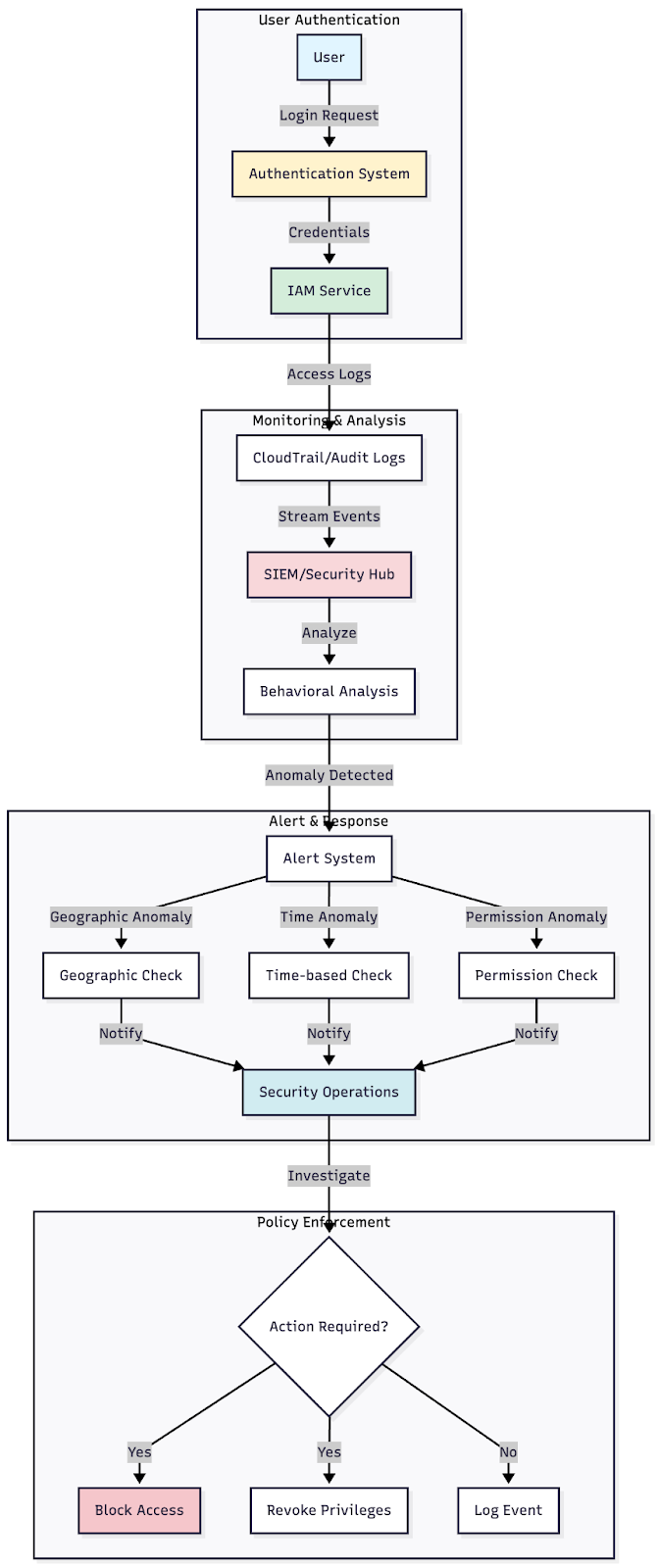
Figure 1: Architecture diagram showing the flow from user authentication through IAM, logging systems and alert mechanisms for privileged access monitoring
Use case 2: Data exfiltration detection and prevention
Cloud environments typically house valuable data, which is precisely why organizations migrate systems to the cloud in the first place. The high availability and accessibility that make cloud platforms attractive also make them targets for data theft.
Even if the data volume within your cloud environment is limited, attackers can use cloud systems as a conduit to exfiltrate local data from your on-premises network, potentially circumventing firewall rules and traffic alerts you've established over the years.
Implementation approach: Monitor any unexplained data leaving cloud systems. This includes large-volume transfers, traffic on suspicious network ports or data containing specific strings or headers that indicate sensitive information. Set up both monitoring and blocking capabilities based on detection confidence levels.
Detection indicators:
- Sudden spikes in egress traffic
- Data transfers to unfamiliar IP addresses or geographic regions
- Unusual access patterns to storage buckets or databases
- File downloads outside regular business hours
- API calls retrieving large data sets
- Use of data compression tools before transfer
Tools for data exfiltration prevention: AWS provides Amazon Macie for discovering and protecting sensitive data, combined with AWS GuardDuty for threat detection and response. Azure offers Microsoft Defender for Cloud Apps, which includes data loss prevention capabilities. Google Cloud provides Cloud Data Loss Prevention API and Security Command Center.
Consider implementing Cloud Access Security Brokers like Netskope, Zscaler or McAfee MVISION Cloud to gain visibility and control over data movement across your cloud services. These platforms can inspect traffic in real time and enforce policies to prevent unauthorized data transfers.
Business impact: Data breaches can cost organizations millions in remediation, regulatory fines and reputational damage. A single incident involving customer data can result in years of recovery efforts. Proper data exfiltration prevention not only protects your data but also maintains customer trust and regulatory compliance.
Understanding the security risks of cloud migration helps organizations implement appropriate controls from the start.
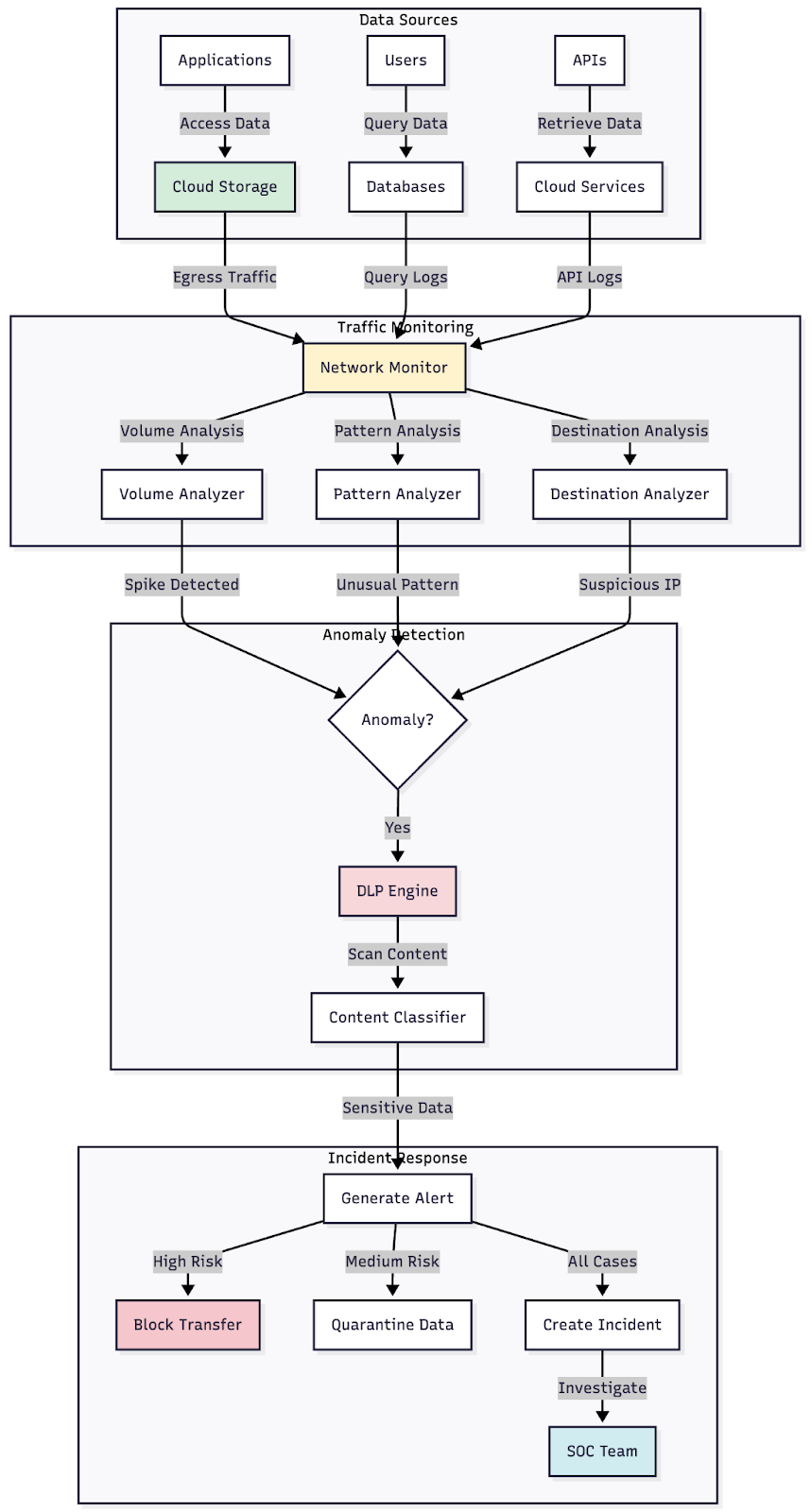
Figure 2: Network diagram showing data flow monitoring points, including API gateways, storage access and egress points with associated detection mechanisms
Use case 3: Suspicious network connections and intrusion detection
Beyond monitoring for data exfiltration, network connections require scrutiny for remote access tool communications, SQL injection attempts, remote and local file inclusions, and numerous other attack vectors. An intrusion detection system or intrusion prevention system provides the best approach for this monitoring.
The encryption challenge: Most cloud communications use encryption, creating a significant problem. Encryption protects data privacy, but it renders traditional IDS systems nearly useless since they can't inspect the actual traffic to match against attack signatures.
SSL decryption provides the answer, but implementing it comes with privacy and compliance considerations that require careful evaluation. Your organization will need to develop policies on which traffic is decrypted, how decrypted data is handled and who has access to decryption capabilities. Platform-specific technical challenges with SSL decryption will likely require assistance from your cloud provider.
Monitoring priorities: Focus on detecting command and control communications, which often follow specific patterns even when encrypted. Monitor for:
- Connections to known malicious IP addresses
- Unusual port usage
- Beaconing behavior (regular connections at set intervals)
- DNS tunneling attempts
- Protocol anomalies that suggest obfuscation
Implementation considerations: Deploy network monitoring at multiple levels. Use cloud-native tools like AWS VPC Flow Logs, Azure Network Watcher or Google Cloud VPC Flow Logs for basic network visibility. Supplement these with dedicated IDS/IPS solutions that can handle the scale of cloud traffic.
For AWS environments, consider Amazon GuardDuty for threat detection or third-party solutions like Trend Micro Deep Security or Palo Alto Networks Prisma Cloud. Azure users can leverage Azure Sentinel combined with network security groups. Google Cloud users should explore Google Chronicle and Virtual Private Cloud service controls.

Figure 3: Diagram showing encrypted and decrypted traffic paths through an IDS/IPS system, with decision points for which traffic requires inspection
Use case 4: Man-in-the-cloud attack prevention
The man-in-the-cloud attack targets authentication tokens stored on devices such as PCs or mobile phones. Local applications use these tokens to automatically authenticate users to cloud platforms, creating a convenient but potentially vulnerable authentication mechanism.
Attack methodology: Attackers typically employ spearphishing campaigns to replace legitimate synchronization tokens with malicious ones. This redirection causes the victim's data to synchronize with the attacker's cloud instance instead of their own. The result? A direct pipeline of the victim's data flowing straight to the attacker's systems.
The sophistication of this attack lies in its subtlety. Users continue to access their applications normally, unaware that their data is simultaneously being copied to a malicious actor's account. The legitimate synchronization token travels through the standard data sync folder, is copied to the attacker's cloud storage and grants the attacker ongoing access.
Detection strategies: Monitor connections to unknown cloud instances through several approaches:
- Endpoint monitoring solutions that track synchronization client behavior
- SSL decryption in the network to inspect cloud service traffic
- Cloud Access Security Broker deployment to track shadow IT
Prevention measures:
- Implement endpoint detection and response tools that monitor for token manipulation
- Use application allowlisting to prevent unauthorized sync clients
- Deploy Cloud Access Security Brokers to control which cloud services can be accessed
- Train users to recognize and report suspicious synchronization requests
- Require MFA for all cloud service access, which limits token-only authentication
Real-world impact: While specific publicly disclosed incidents are limited due to the attack's stealthy nature, security researchers have demonstrated the effectiveness of man-in-the-cloud attacks across major cloud storage platforms. Organizations in the healthcare, finance and legal sectors face particularly high risk due to the sensitive nature of documents that are typically synchronized to cloud storage.
To better understand various cloud attack vectors and countermeasures, security professionals should familiarize themselves with the full spectrum of cloud-specific threats.
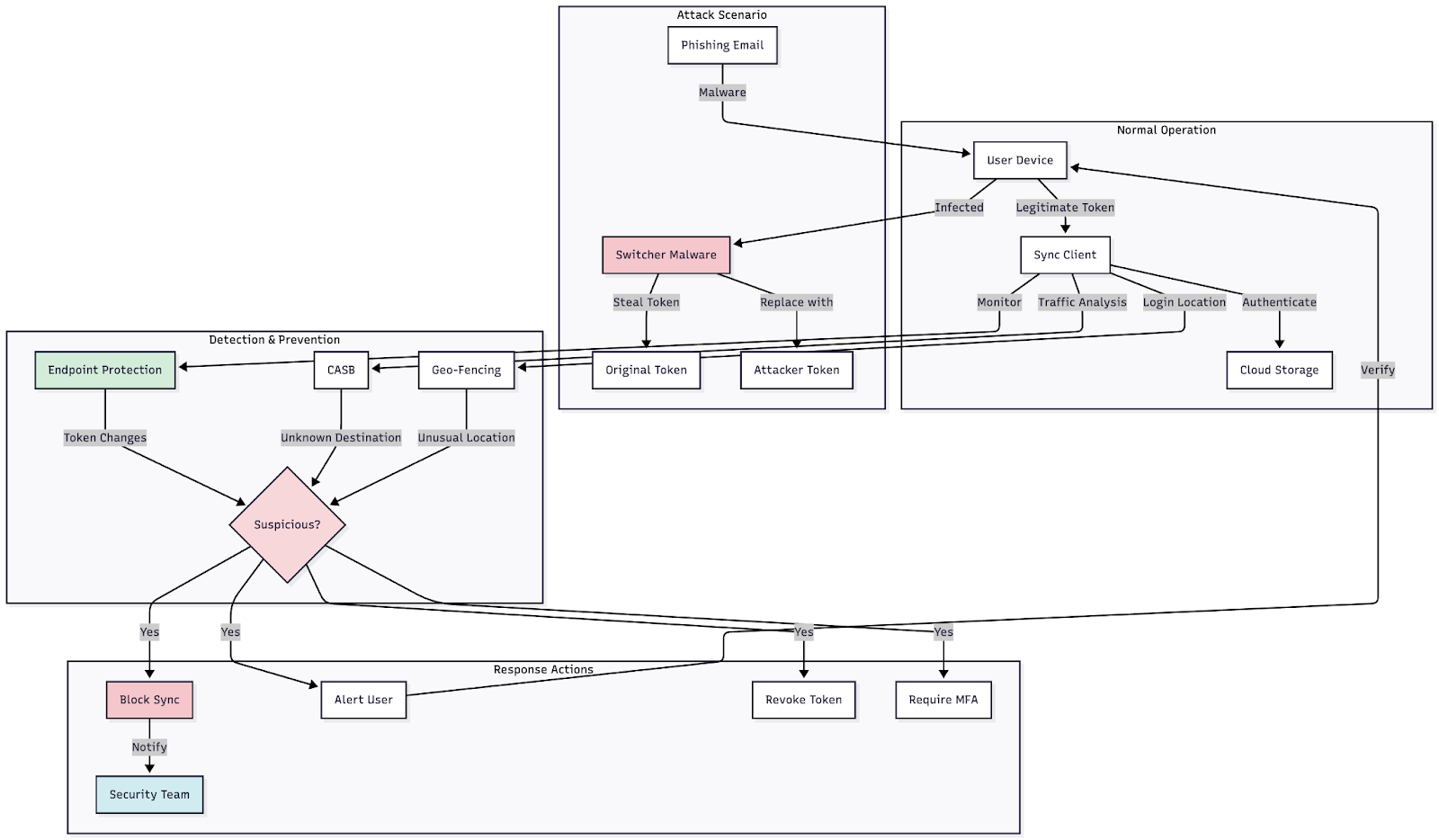
Figure 4: Flow diagram showing the token replacement process, from initial compromise through data exfiltration, with intervention points marked
Learn Network Traffic Analysis for Incident Response
Use case 5: Unsecured storage container protection
Whether called buckets, containers or something else, cloud storage repositories require careful access management and monitoring. The ease of creating cloud storage, combined with complex permission models, has led to countless data exposures.
Common vulnerabilities: Misconfigured storage buckets are among the most frequent cloud security issues. Default permissions sometimes allow public read access, and administrators may not fully understand the permission inheritance model. Attackers use fully automated scanners, such as S3 Scanner and AWSBucketDump, to locate unsecured buckets at scale.
Monitoring requirements: Watch for large, unexpected amounts of incoming or outgoing data involving storage containers. Access from suspicious sources needs immediate investigation. When possible, monitor API calls to the storage platform for suspicious activity, though this requires SSL decryption unless detailed cloud storage logs are available.
Implementation guidance:
- Enable storage access logging across all buckets and containers
- Implement bucket policies that explicitly deny public access by default
- Use cloud-native tools to scan for misconfigurations regularly
- Set up alerts for any permission changes to storage resources
- Implement data classification and apply appropriate access controls
- Use customer-managed encryption keys for sensitive data
Platform-specific approaches: AWS S3 provides Block Public Access settings, bucket policies and AWS Config rules to enforce secure configurations. Enable S3 Access Analyzer to identify buckets accessible from outside your organization. Azure Storage offers Azure Storage firewalls, private endpoints and Azure Policy to enforce security standards. Google Cloud Storage uses IAM, bucket policies and Organization Policy Service to control access.
Success metrics: Measure the number of publicly accessible storage containers, mean time to detect misconfiguration, percentage of storage using encryption and compliance with data classification policies.
Understanding proper data sanitization for cloud storage is essential for maintaining data security throughout its lifecycle.
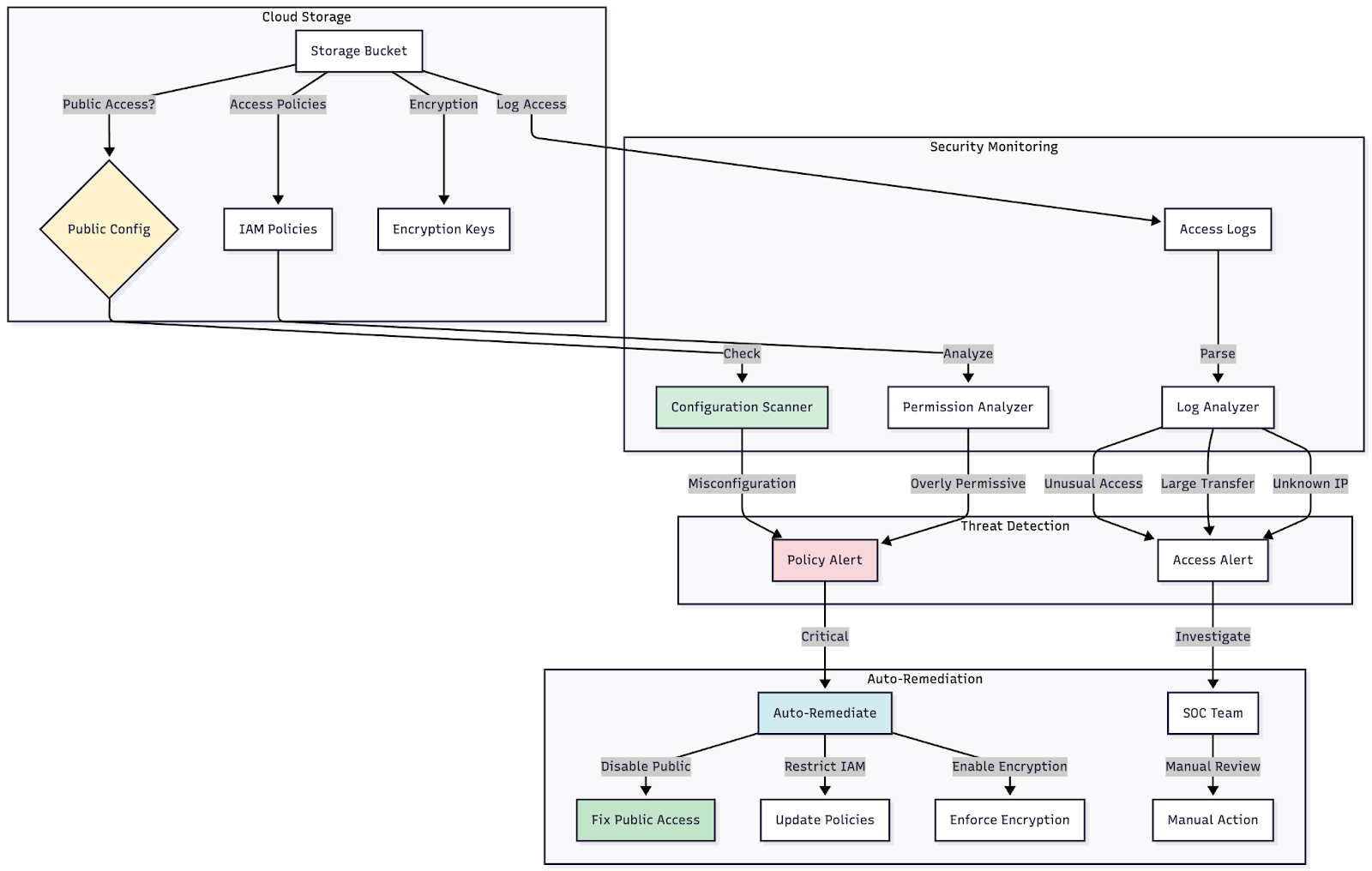
Figure 5: Diagram showing secure vs. insecure storage configurations, with policy enforcement points and monitoring locations clearly marked
Use case 6: API security and authentication monitoring
APIs serve as the backbone of modern cloud architectures, facilitating communication between services, applications and users. This makes them critical security focal points.
API-specific threats: Attackers target APIs to bypass traditional security controls. Common attack vectors include authentication bypass, authorization flaws, excessive data exposure, rate limiting bypass and injection attacks. The OWASP API Security Top 10 provides comprehensive guidance on these threats.
Monitoring approach:
Track API authentication attempts, focusing on failed authentication attempts that may indicate credential stuffing or brute-force attacks. Monitor for API calls that access resources outside standard patterns for the authenticated user. Set rate limits and track when applications or users approach or exceed those limits.
Implementation strategy:
- Implement API gateways with built-in security features
- Use OAuth 2.0 or OpenID Connect for authentication
- Apply the principle of least privilege to API access
- Implement request validation and input sanitization
- Use API versioning to deprecate vulnerable endpoints
- Enable comprehensive API logging
Tools and platforms: AWS provides Amazon API Gateway with AWS WAF integration for API protection. Azure offers Azure API Management with built-in security policies. Google Cloud delivers Apigee API Management and Cloud Endpoints. Third-party solutions such as Kong, Tyk and AWS API Gateway can provide additional API security capabilities.

Figure 6: Architecture diagram showing the API request flow, including authentication, authorization, rate limiting and logging at each stage
Use case 7: Identity federation and single sign-on security
As organizations adopt multiple cloud services, identity federation and single sign-on become essential for user experience and security. These systems also become attractive targets for attackers.
Security considerations: A compromised SSO system provides attackers with access to all connected applications. This makes monitoring federation configurations and authentication flows critical for security teams.
Key monitoring points:
- Track SSO authentication attempts and failures
- Monitor for new service provider integrations
- Alert on changes to federation trust relationships
- Watch for unusual patterns in token issuance
- Detect attempts to access disabled or removed accounts
Implementation best practices:
- Require MFA for all federated identities
- Implement conditional access policies based on risk signals
- Use time-limited authentication tokens
- Monitor for token replay attempts
- Regularly audit and remove unused SSO integrations
- Implement strong session management
Platform capabilities: Azure Active Directory provides comprehensive SSO with conditional access. AWS offers AWS IAM Identity Center (formerly AWS SSO) for federation. Google Cloud delivers Cloud Identity with SSO capabilities. Okta, Ping Identity and OneLogin offer third-party solutions with extensive integration options.
Organizations that implement proper cloud network security through virtual DMZs create additional defense layers around their authentication systems.
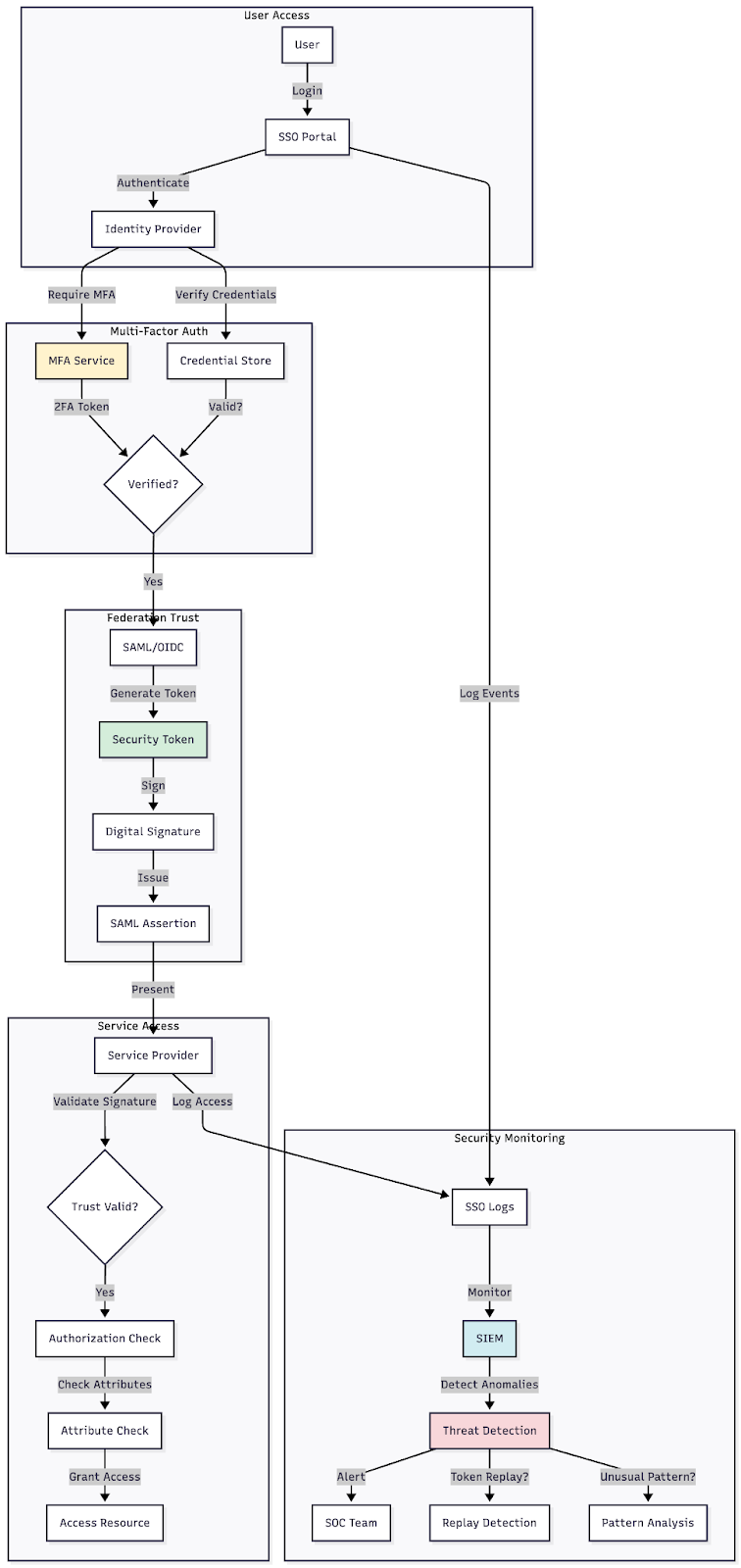
Figure 7: Flow diagram showing the federation authentication process, trust relationships and security validation points
Use case 8: Container and Kubernetes security
As containerization becomes standard for cloud applications, securing containerized workloads and orchestration platforms presents unique challenges.
Container-specific threats: Containers share the host operating system's kernel, creating a potential vulnerability for container escape attacks. Vulnerable container images can introduce known exploits into your environment. Misconfigured Kubernetes clusters often expose management interfaces to the internet.
Security requirements:
- Scan container images for vulnerabilities before deployment
- Use minimal base images to reduce attack surface
- Implement pod security policies in Kubernetes
- Network segmentation between containers
- Runtime threat detection for containerized applications
- Secrets management for credentials used by containers
Monitoring approach: Track container deployment patterns and watch for containers launched from unknown or unverified images. Monitor network connections between containers for suspicious communication patterns. Alert on privilege escalation attempts within containers or Kubernetes clusters.
Implementation tools: AWS provides Amazon ECS and EKS with built-in integration with AWS Security Hub. Azure offers Azure Kubernetes Service with Microsoft Defender for Containers. Google Cloud delivers GKE with Container Security scanning. Third-party tools such as Aqua Security, Twistlock (now Prisma Cloud), and Sysdig Secure provide comprehensive container security.
Success metrics: Measure the percentage of containers deployed from verified images, mean time to patch vulnerable containers, number of runtime security violations and compliance with pod security standards.
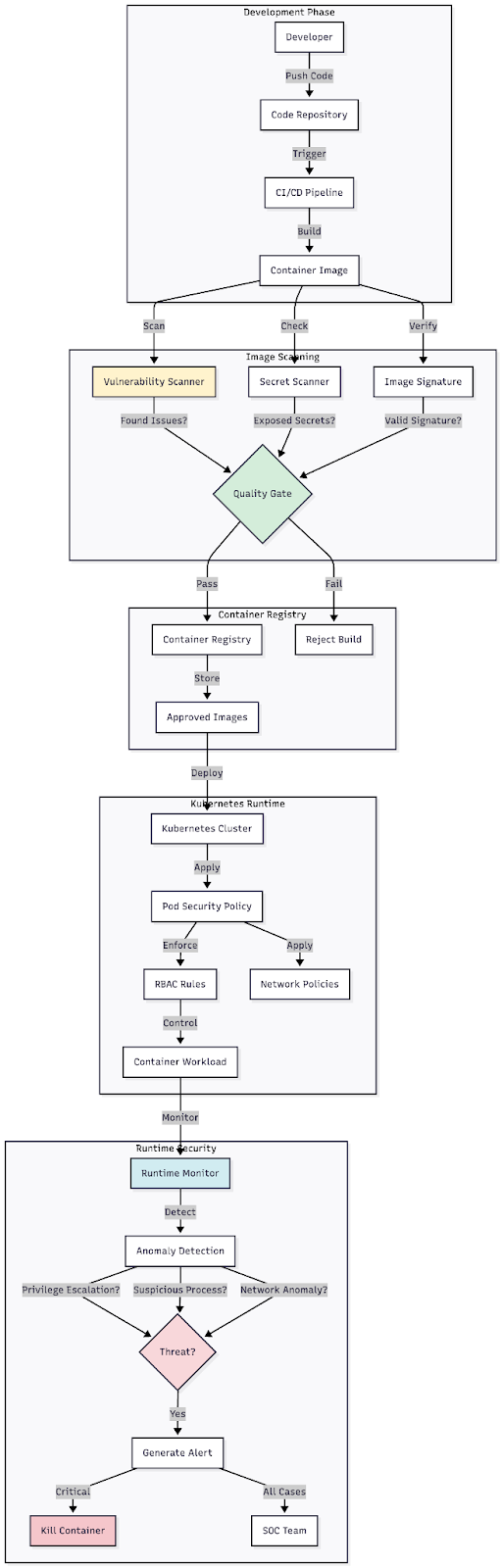
Figure 8: Layered security diagram showing container security controls from image scanning through runtime protection
Implementing cloud security use cases
Getting started with these use cases requires setting out the requirements first. Line up the necessary logs and infrastructure to support each use case. Too often, organizations end up with "broken" use cases and unactionable alerts because key information is structurally missing, yet implementation proceeds without addressing these issues.
Foundational requirements:
- Ensure comprehensive logging is enabled across all cloud services
- Implement centralized log aggregation and analysis
- Establish baseline behavior for normal operations
- Define clear escalation procedures and responsibilities
- Test use cases regularly to verify effectiveness
Maturity progression: Start with the most critical use case for your organization, typically privileged access monitoring. Build expertise with one use case before expanding to others. As each use case matures, refine detection rules and response procedures based on real-world experience.
Integration considerations: Most organizations will need to integrate cloud security monitoring with existing security operations. Ensure your SIEM platform can ingest cloud logs. Establish workflows that connect cloud security alerts with your incident response procedures to ensure seamless integration. Cross-train your security team on cloud-specific threats and investigation techniques.
Cloud security presents its own unique challenges and requirements. Some are more specific to cloud environments than others, but all require consideration of the unique aspects of cloud platforms. The shared responsibility model means security is a partnership between cloud providers and customers, with customers ultimately responsible for protecting their data and applications.
Learn Vulnerability Assessments
Advancing your cloud security expertise
Cloud security professionals are in high demand as organizations continue migrating critical workloads to the cloud. Building expertise in implementing these use cases strengthens your value to your organization and advances your career.
Next steps:
- Explore our entry-level cybersecurity careers guide to understand career paths in cloud security
- Review the cybersecurity salary guide to understand compensation for cloud security roles
- Take advantage of the free AWS workshop to gain hands-on experience
The cloud security landscape continues to evolve rapidly. Staying current with emerging threats, new security tools and changing best practices ensures you can effectively protect your organization's cloud infrastructure. These eight use cases provide a comprehensive framework for building a strong cloud security program that addresses the most common and impactful threats facing cloud environments today.

- Expert instruction
- Hands-on labs
- Unlimited access
In this series
- Cloud security use cases: 8 essential scenarios to protect your infrastructure
- CompTIA CySA+ Salary: What to expect in 2025
- How to become a cybercrime investigator
- CEH version comparison: V12 to V13 evolution guide
- SecurityX (CASP+) certification: Overview and career path [2025 update]
- Network+ certification: Overview and career path [2025 update]
- ISC2 CSSLP certification overview: What you need to know
- ISC2 CGRC: Overview & career path
- CRISC certification: Overview & career path [updated 2021]
- PMP certification: Overview and career path [updated 2021]
- ISACA CDPSE certification: Overview of the new ISACA privacy certification
- CGEIT certification: Overview and career path [updated 2021]
- What is a cyber range?
- Microsoft azure certification: Overview And career path
- CEH salary guide: What Certified Ethical Hackers really earn
- Average SecurityX (CASP+) salary [2025 update]
- CompTIA Network+ certification — A 2025 salary analysis
- CompTIA CySA+ exam (CSO-003): Your guide
- CCSP salary: How much can you make as a cloud security professional?
- Average Security+ salary (2025): Your guide to a prosperous cybersecurity career
- Average CGRC (Certified in Governance, Risk and Compliance) salary
- CRISC Frequently Asked Questions (FAQ) [updated 2022]
- Average CSSLP Salary in 2021
- ISACA CDPSE exam details and process
- How To Become CGEIT Certified – Certification Requirements [updated 2021]
- How to pick the best cyber range for your cybersecurity training needs and budget
- CEH exam eligibility: Application process & requirements guide
- SecurityX (CASP+) frequently asked questions (FAQ) [2025 update]
- CISSP domains overview: Your complete preparation guide
- CCSP exam and CBK changes in August 2024
- Comprehensive guide to CompTIA Security+ domains (2025)
- Average CRISC Salary [2023 update]
- CGRC certification job titles and career outlook
- ISC2 CSSLP exam details and process
- ISACA CDPSE certification exam: Overview of domains
- An Introduction to the PMP: Exam Details and Process [updated 2021]
- CGEIT certification exam: overview of domains [Updated 2021]
- 10 Success Tips: How to Pass Your Certified Ethical Hacker (CEH) Exam
- Network+: Exam details and process [2025 update]
- SecurityX (CASP+): Exam details and process [2025 update]
- How to become CCSP certified: Certification requirements
- Certified in Risk & Information Systems Control (CRISC) Exam Overview [updated 2022]
- ISC2 CGRC exam details and process
- Best CSSLP study resources and training materials
- ISACA CDPSE domain 1: Privacy governance
- 10 Tips for PMP Certification Exam Success [updated 2021]
- CGEIT certification exam details and process [updated 2021]
- Certified Ethical Hacker (CEH) study guides & resources [updated 2025]
- CompTIA SecurityX resources: Videos, books, tests and more!
- How to get the CompTIA Network+ certification: Requirements and step-by-step instructions [2025 update]
- CySA+ exam objectives: The 4 domains that will be covered
- Reduce security events
- Reinforce cyber secure behaviors
- Strengthen cybersecurity culture at your organization

CompTIA CySA+
Discover the latest salary trends for CompTIA CySA+ certified professionals in 2024. Learn what factors influence your earning potential in the cybersecurity field.


Cybercrime investigator
Cybercrime has hit record levels, with an expected $7 trillion USD to be made from cybercriminal activity by 2021. Investigating these sorts of crimes can be

EC-Council CEH
CEH v13 is the world's first AI-powered ethical hacking certification. Discover what's new, how it compares to v12/v11 and why it's a career game-changer.

CompTIA SecurityX
Explore the expert-level CompTIA SecurityX certification, what to expect on the exam, the career benefits and more.