
Virtual DMZ cloud architecture: Securing AWS, Azure and GCP environments

Article content
Virtual DMZ cloud architecture provides a critical security buffer that separates networks into isolated blocks across AWS, Azure and GCP environments. A demilitarized zone, or DMZ, comes from the military concept of a neutral zone between opposing forces where combat is prohibited.
When managing network infrastructure, you need specific services accessible from the internet while keeping internal systems secure. Standard externally exposed services include HTTP, FTP, SMTP, DNS, and SSH. A DMZ creates distinct network segments where only defined traffic can traverse between zones using firewalls, intrusion detection systems, and intrusion prevention systems.
Planning network topology requires careful consideration of which traffic should pass between segments. Keep in mind that DMZ networks are inherently less secure than internal networks, so you must protect them from both external and internal attacks. If an attacker exploits a vulnerability in an externally accessible service and breaches the DMZ, proper security measures should prevent lateral movement to other internal systems.
Editor’s note: Ready to enhance your cloud security skills? Take advantage of Infosec’s free AWS cloud workshop to gain hands-on experience with AWS security architecture.
Understanding network segmentation fundamentals
Network packets traverse the TCP/IP stack through an encapsulation process. At each layer, headers are appended to the transmitted data. These headers correspond to the OSI model layers, with each serving a specific function in network communication.
Different network devices route packets from source to destination at various layers of the network. Hubs operate at the physical layer, copying packets to all ports regardless of destination. Switches function at the data link layer, using MAC addresses stored in ARP tables to forward packets only to their intended destinations. Routers work at the network layer, using IP addresses to route traffic between networks.
Understanding these devices explains why allocating different subnets for each DMZ network is essential. If you place an externally accessible host A and an internal-only host B on the same subnet, securing host B becomes problematic even with a router. While firewall rules can provide some protection, their configuration can become complex and error-prone.
Consider hosts using DHCP with dynamic IP assignment based on MAC addresses. An attacker who compromises host A could change the MAC address, request a new IP, and potentially bypass firewall rules designed for the original address. Even with static IPs, manual address changes could circumvent security controls.
Placing externally accessible hosts in a separate subnet from internal hosts solves these problems. The attacker who compromises host A cannot access host B, regardless of IP address manipulation. Proper firewall rules on the router are still required, but they're fewer in number and easier to maintain.
DMZs are simply separate subnets with well-defined firewall rules between network segments. Traffic between subnets must traverse the network layer, where you can define allowed protocols and enforce security policies for traffic entering and exiting each subnet.
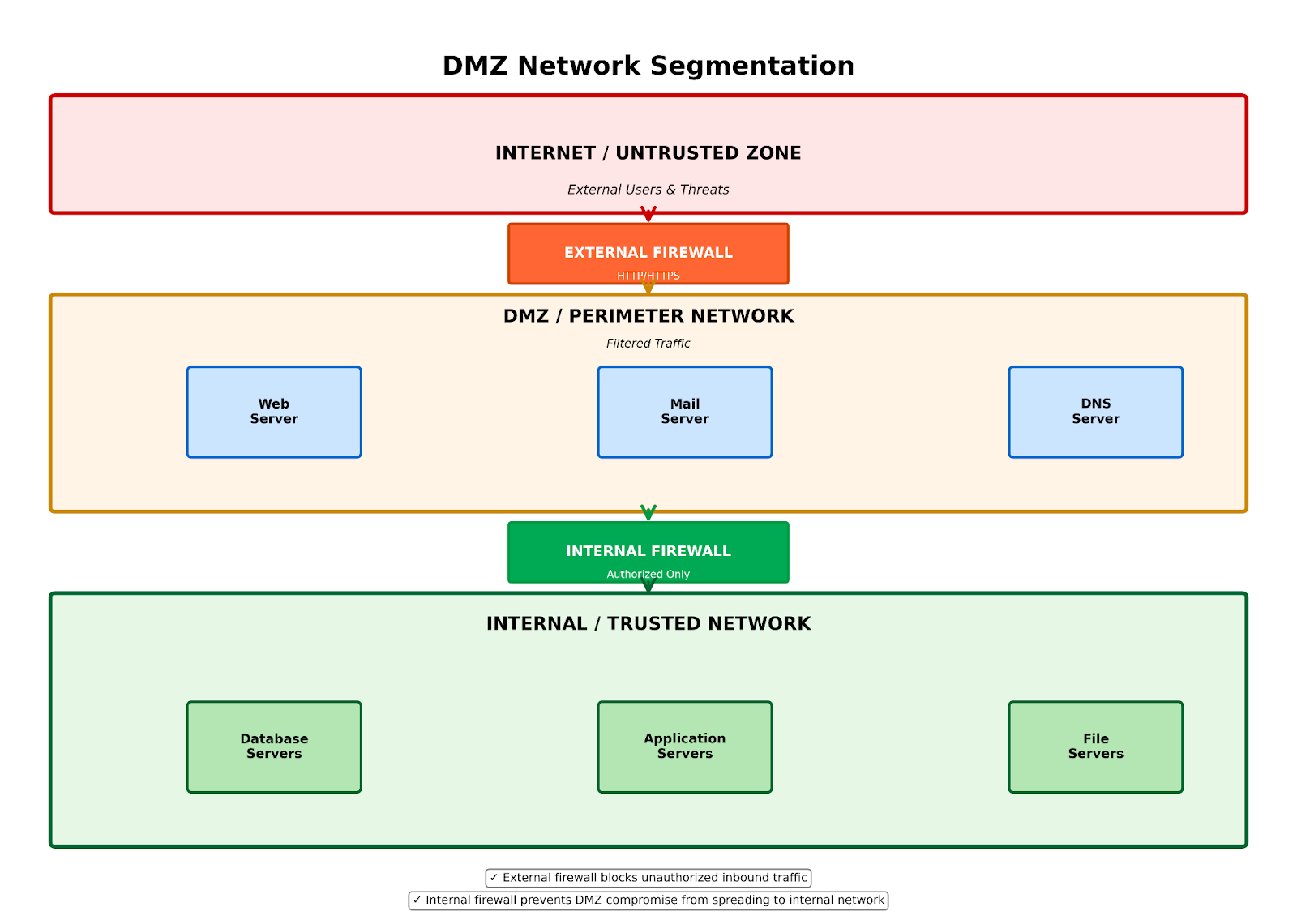
Figure 1: Network segmentation diagram illustrating three-tier DMZ architecture with external firewall, DMZ zone with web/mail/DNS servers, internal firewall and protected internal network
DMZ architectures in physical environments
Setting up a physical DMZ involves connecting servers to separate logical networks with firewalls at the Internet and internal network borders. A basic DMZ places the external firewall as the first line of defense, with ports open only for required external services. If an attacker compromises a DMZ host, they must still bypass the internal firewall to access internal machines.
The most common physical DMZ uses a single firewall with three interfaces: one for the external network, one for the DMZ, and one for the internal network. This approach is cost-effective since it requires only one firewall device. A more secure but expensive alternative uses two different firewall vendors, ensuring that if an attacker bypasses one firewall, they won't easily bypass the second.
Every DMZ host should have two network interface cards when possible. The first connects to external networks for client access, with a default gateway outside the firewall. The second connects internally for database access or backups, with a default gateway inside the firewall. Dual NICs provide a physical-layer defense by requiring attackers to compromise both interfaces and by ensuring that external and internal networks don't share routing infrastructure.
Technologies for isolating DMZ networks include:
- Physical network separation provides the strongest isolation by routing all inter-DMZ traffic through security appliances. This method requires the most hardware but offers the highest level of security.
- Logical network separation segments traffic using network device features without additional physical hardware.
- Virtual LANs (VLANs) operate at layer 2, placing interfaces with matching tags in the same broadcast domain. VLAN tagging allows multiple VLANs to be trunked over a single switch port, enabling network segmentation without additional hardware.
- Virtual routing and forwarding (VRF) operates at layer 3, allowing multiple routing tables to coexist on a single router. This enables network segmentation using a single device.
- Multiprotocol Label Switching (MPLS) routes packets at layer 3 based on labels rather than network addresses, identifying paths to distant nodes.
- Virtual switches (vSwitch) in virtualization platforms like VMware can separate networks within virtual environments.
Firewalls in these configurations are typically security appliances, such as Cisco ASA, that offer firewall protection, application security, denial-of-service protection, access control lists, VPN capabilities, and more. This comprehensive inspection blocks malicious traffic before it reaches internal networks.
DMZ hosts should run only essential services to minimize the attack surface. Unpatched or unnecessary services provide easy targets for attackers. Use different passwords for DMZ servers than for other network hosts to limit attacker movement.
Virtual DMZ implementation in cloud environments
When properly configured, virtualized DMZs match the security levels of physical DMZs. The virtualization layer itself doesn't reduce security. Recent years have seen a shift from physical to virtual DMZs in cloud architecture, with physical servers being migrated to virtual machines running on shared hosts.
The primary security concern with virtualized DMZs is misconfiguration, not the underlying technology. A typical virtualized DMZ resembles a physical DMZ but uses virtual machines within each security zone instead of physical ones.
AWS DMZ architecture
AWS provides several building blocks for creating a robust cloud security architecture with DMZ implementations. A typical AWS DMZ implementation uses a Virtual Private Cloud (VPC) with multiple subnets:
- Public subnet (DMZ) hosts resources that need Internet access, such as web application firewalls, bastion hosts, and NAT gateways. This subnet has an Internet gateway attached and routes public traffic through firewall appliances.
- Private subnets contain application and database tiers protected from direct Internet access. Security groups act as virtual firewalls controlling inbound and outbound traffic.
- Network ACLs provide subnet-level stateless filtering as an additional security layer.
For a basic AWS DMZ:
VPC (10.0.0.0/16)
├── Public Subnet (10.0.1.0/24) - DMZ
│ ├── NAT Gateway
│ ├── Bastion Host
│ └── Application Load Balancer
├── Private Subnet 1 (10.0.2.0/24) - Application Tier
│ └── EC2 Instances
└── Private Subnet 2 (10.0.3.0/24) - Database Tier
└── RDS Instances
AWS security groups should follow the principle of least privilege. The DMZ subnet security group allows ingress from the Internet on necessary ports (80/443) while permitting egress only to required application tier resources. Application tier security groups accept connections only from the DMZ subnet.
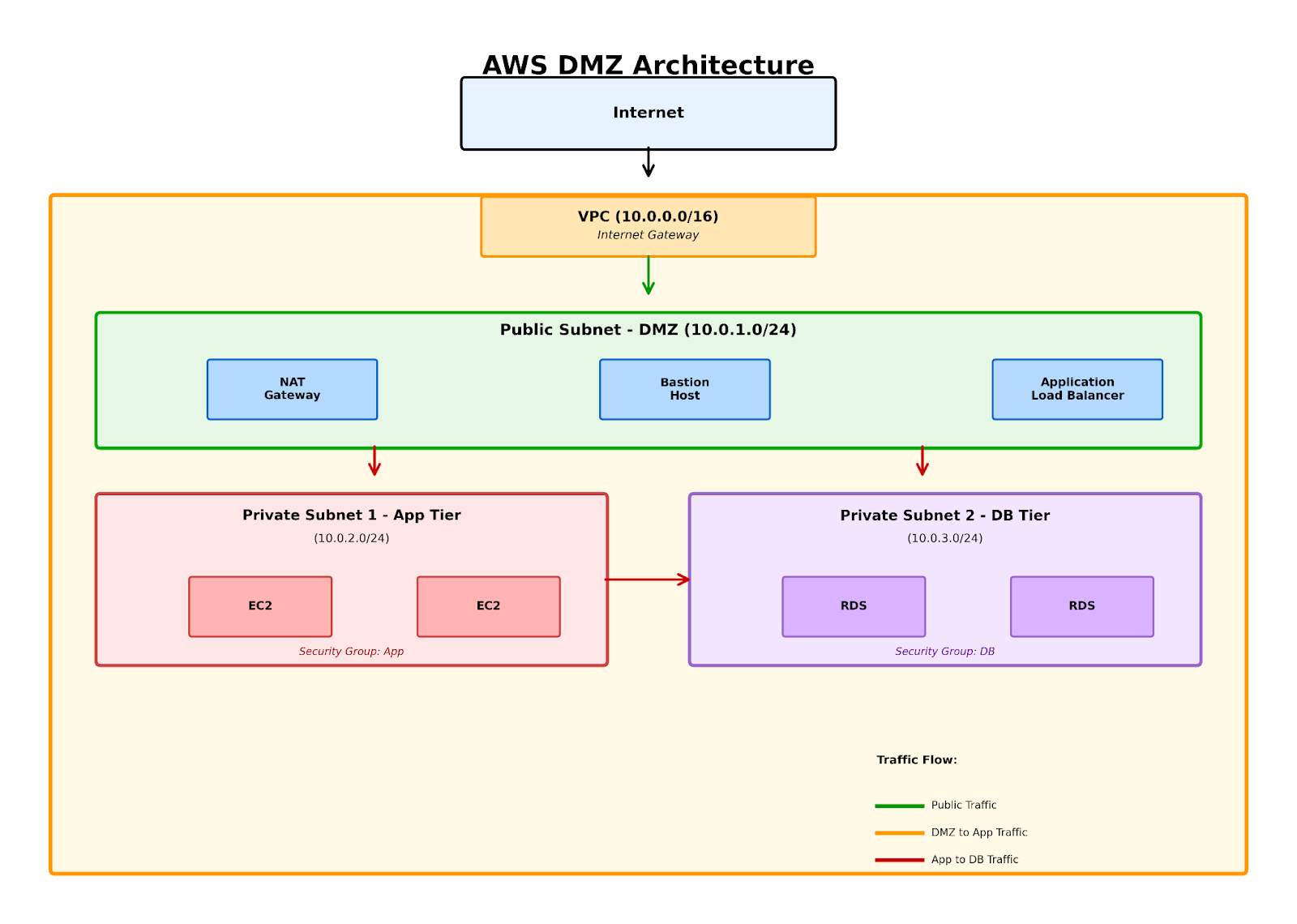 Figure 2: AWS VPC architecture showing DMZ implementation with public subnet containing NAT gateway and bastion host, connected to private subnets for application and database tiers
- VPC endpoints enable private connectivity between your VPC and AWS services without requiring Internet gateways or NAT devices. This keeps traffic on the AWS backbone network.
- AWS Network Firewall provides managed stateful firewall protection at the VPC level, offering intrusion prevention and detection capabilities.
Third-party virtual appliances from Palo Alto Networks, Fortinet, and CheckPoint are available on AWS Marketplace for advanced firewall capabilities.
Azure DMZ design
Microsoft Azure implements DMZs using virtual networks (VNets), which are divided into subnets, with network security groups (NSGs) and user-defined routing.
A typical Azure DMZ architecture includes:
- Security subnet containing firewall virtual appliances or Azure Firewall, serving as the entry point for all traffic.
- Frontend subnet hosting web servers with NSG rules allowing HTTP/HTTPS from the security subnet.
- Backend subnet containing application and database servers, accessible only from the frontend subnet.
Azure NSGs provide five-tuple rule filtering (source IP, source port, destination IP, destination port, protocol). User-defined routes override default Azure routing to force traffic through firewall appliances.
Azure Firewall, a cloud-native firewall service, offers:
- Stateful packet inspection
- Application-level filtering
- Threat intelligence-based filtering
- High availability and scalability
For hybrid scenarios, Azure ExpressRoute or VPN Gateway connects on-premises networks to Azure VNets while maintaining DMZ security controls.
Azure Bastion provides secure RDP and SSH access to virtual machines without exposing them to public IPs, acting as a jump box within the DMZ architecture.
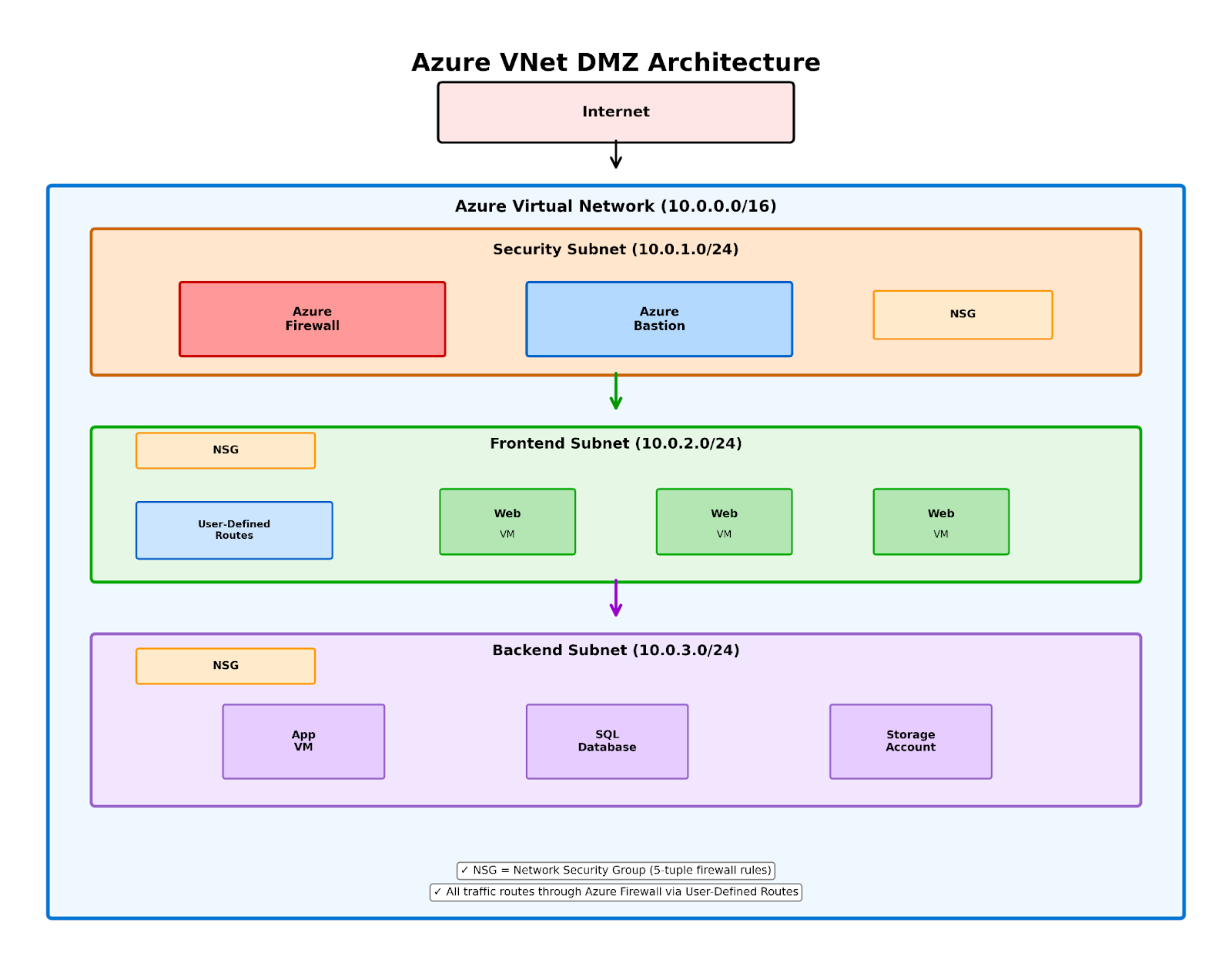 Figure 3: Azure Virtual Network DMZ design with security subnet containing Azure Firewall and Bastion, frontend subnet with web VMs, and backend subnet with databases, all controlled by Network Security Groups
Google Cloud Platform DMZ patterns
GCP's software-defined networking simplifies DMZ construction with global VPCs and flexible subnet management.
GCP DMZs typically use:
- VPC with multiple subnets spanning regions as needed, unlike Azure's regional restriction.
- Firewall rules combine the functionality of both security groups and network ACLs in other clouds.
- Cloud NAT for outbound Internet access from private instances.
- Cloud Load Balancing distributes traffic across DMZ resources globally.
GCP's hierarchical firewall policies allow centralized rule management across multiple VPCs and projects, simplifying security governance in large organizations.
Virtualized DMZ configurations
Three standard virtualized DMZ configurations exist:
- Partially collapsed DMZ with separate physical trust zones maintains physical separation between zones while virtualizing hosts within each zone. This resembles physical DMZs with network separation on physical infrastructure rather than within virtualization.
- Partially collapsed DMZ with virtual separation places different zones on the same ESX host but uses separate virtual switches. Each DMZ connects to its own virtual switch, separating hosts between zones. Communication between zones still traverses the physical network. Regular verification ensures virtual machines remain in the correct networks.
- Fully collapsed DMZ virtualizes everything, including network separation, when properly configured. All isolation occurs within the virtualization layer.
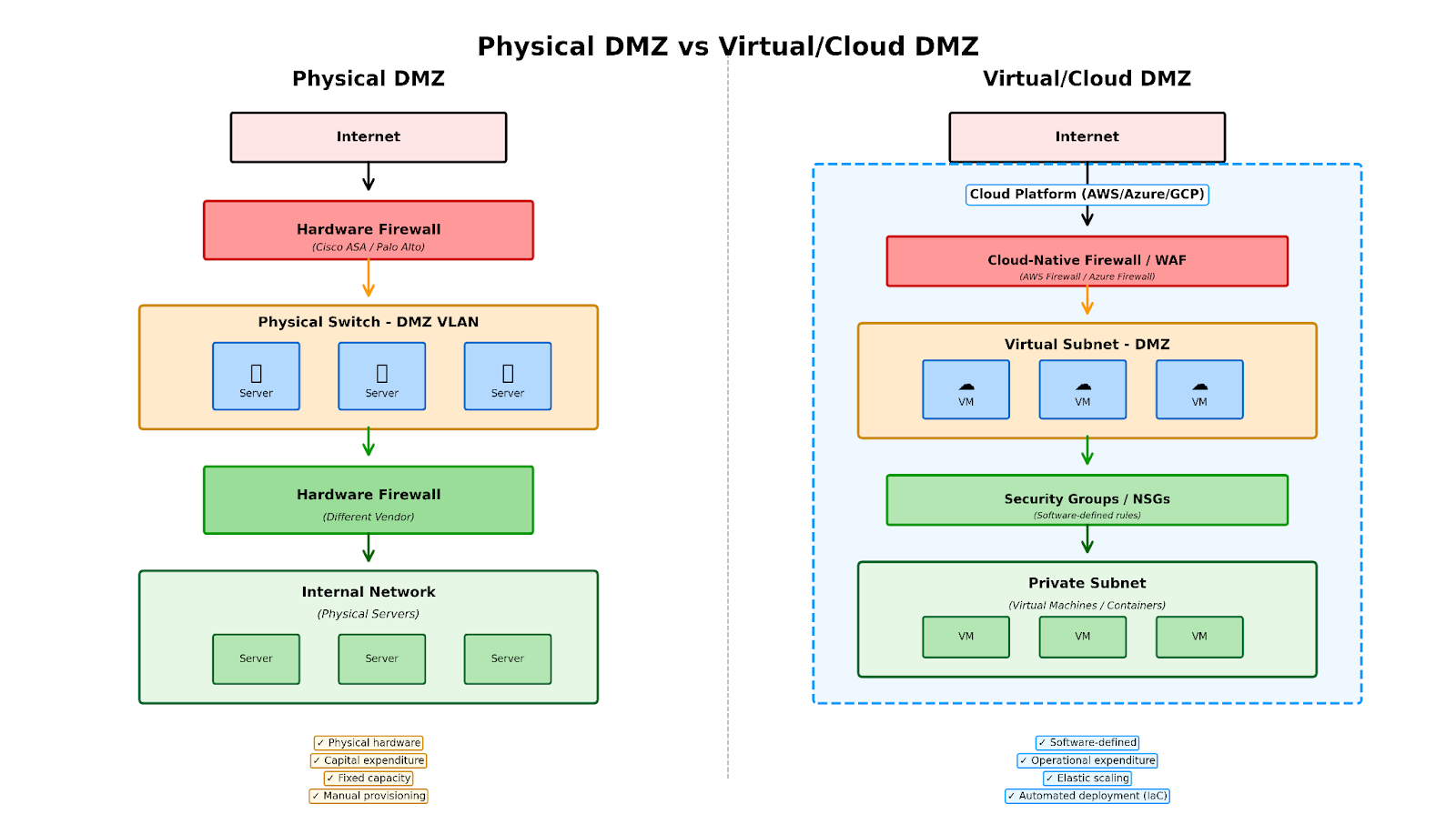 Figure 4: Comparison of physical DMZ with hardware firewalls and switches versus virtual cloud DMZ with software-defined security controls and elastic scaling
Security considerations for virtual DMZs
Virtual DMZ in cloud architecture security requires attention to several areas:
- Hypervisor compromise represents the most significant concern in virtual machine security. An attacker compromising the ESX host could access all virtual machines, including internal systems. While rare, vulnerabilities like Cloudburst (discovered by Immunity Inc. in 2008) demonstrate the possibility of escaping virtual machine isolation. Regular updates to virtualization software are essential.
- Virtual NIC configuration mistakes can expose systems. Placing a virtual NIC in the wrong virtual switch could grant a VM unauthorized access to sensitive DMZ data. This risk exists equally in physical DMZs, where miscabling can cause similar problems.
- Service console and VMkernel access require proper isolation. Attackers could brute-force credentials through a compromised VM to access the management console, gaining control of all VMs on the host. Management interfaces need dedicated networks with redundant NICs. DMZ VMs should never share networks with service consoles or VMkernel.
- Storage network access should be isolated within its own network, typically using iSCSI or NFS. This prevents compromised VMs from accessing storage systems.
- Virtual switch protections can detect and prevent layer 2 attacks, including MAC spoofing, man-in-the-middle attacks, and promiscuous mode abuse.
- Virtual machine resource limitations prevent denial-of-service attacks. Without resource limits, a compromised VM could consume all host resources, affecting other VMs. Proper resource allocation ensures each VM receives its share.
- Port group separation for DMZ networks can use separate port groups with dedicated physical NICs or multiple VLANs on the same port group. Dedicated port groups with separate NICs provide better physical separation since traffic must traverse physical routers, where firewalls can filter it.
- Configuration auditing of virtualized DMZ networks should be conducted regularly to ensure that security best practices remain in place.
- User role configuration should follow the principle of least privilege. Administrators need only the access required for their responsibilities, not root access to hosts.
Cloud-native security enhancements
Modern cloud environments offer security capabilities beyond traditional DMZ concepts:
- Web application firewalls like AWS WAF and Azure Web Application Firewall provide application-layer protection, filtering malicious requests before they reach backend resources.
- DDoS protection services (AWS Shield, Azure DDoS Protection) defend against volumetric attacks that could overwhelm DMZ resources.
- Identity and access management integration ensures that authentication and authorization occur before traffic reaches DMZ resources. Proper PKI-based cloud certificate management enables secure authentication across DMZ components. Cloud-native IAM systems like AWS IAM and Azure Active Directory provide fine-grained access control.
- Security information and event management collects and analyzes logs from all DMZ components, enabling threat detection and incident response. AWS CloudTrail, Azure Monitor, and GCP Cloud Logging provide comprehensive visibility.
- Automated security responses through services like AWS Lambda or Azure Functions can automatically remediate security issues, such as isolating compromised instances or updating firewall rules.
Zero trust as a complementary approach
While DMZs remain relevant, zero-trust architecture complements traditional perimeter security. Zero trust operates on the principle of "never trust, always verify," requiring continuous authentication and authorization regardless of network location.
Zero trust architecture doesn't replace DMZs but enhances them by:
- Assuming breach and limiting lateral movement through micro-segmentation, so compromised DMZ hosts can't easily access other resources.
- Verifying explicitly at every access request rather than trusting the network location. Users and devices must authenticate continuously.
- Applying least privilege access ensures entities have only the permissions required for their current task.
- Segmenting access prevents broad network access even for authenticated users, containing potential breaches.
Organizations increasingly implement zero-trust principles within DMZ architectures. For example, placing a zero-trust network access (ZTNA) solution in the DMZ provides secure application access without exposing internal networks. Cloud-native services like AWS PrivateLink and Azure Private Link enable private connectivity and support zero-trust principles.
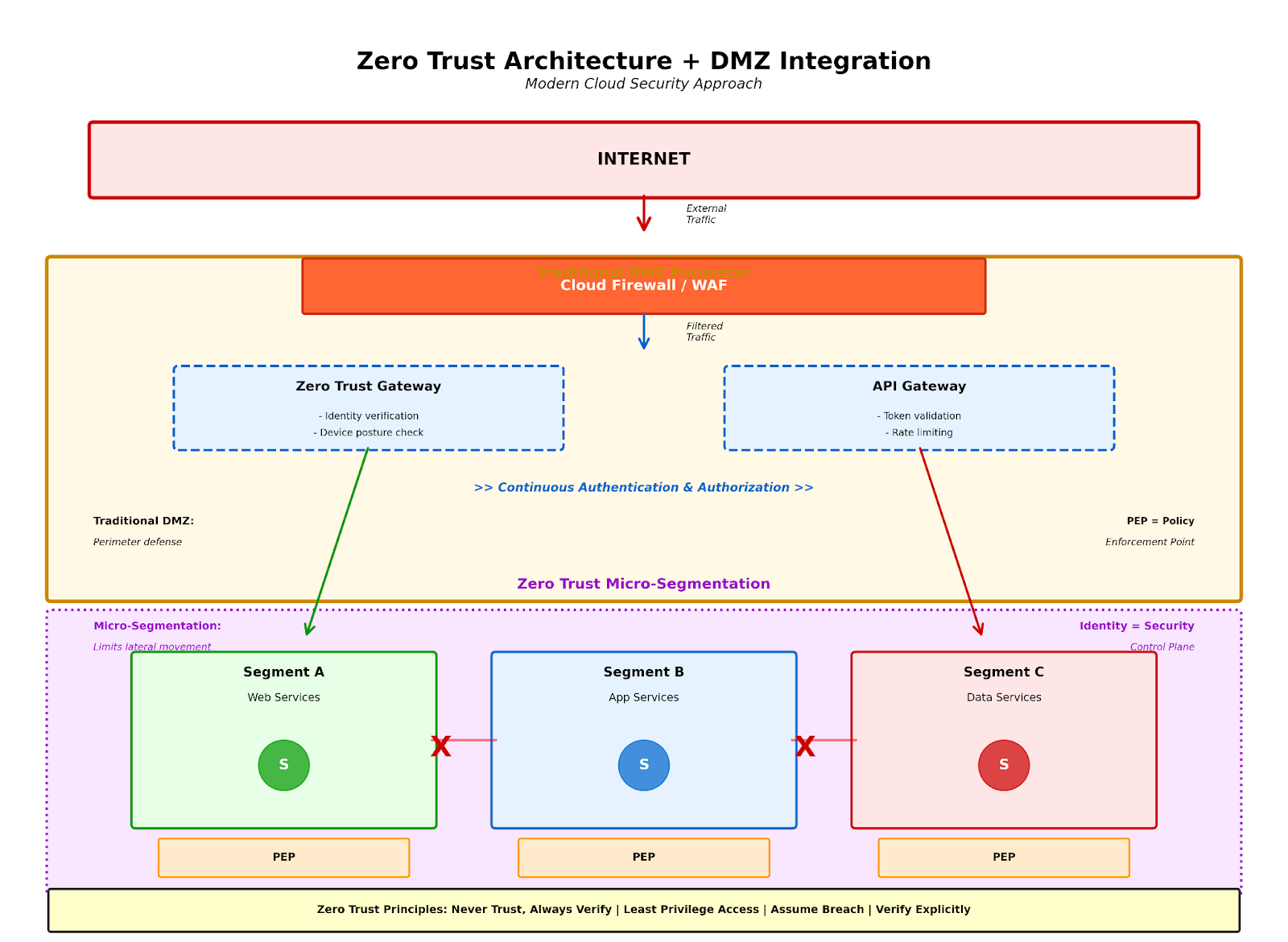
Figure 5: Modern security architecture combining traditional DMZ perimeter with Zero Trust principles, showing micro-segmentation, continuous authentication, and blocked lateral movement between segments
Zero trust is quickly becoming the baseline security model for enterprises. This shift is driven by hybrid work, sophisticated attacks, and the limitations of traditional perimeter-based security.
Infrastructure as code for DMZ deployment
Modern cloud DMZs are deployed using infrastructure-as-code (IaC), ensuring consistent, repeatable configurations.
Terraform example for AWS DMZ
Here's a simplified CloudFormation configuration for an AWS DMZ:
AWSTemplateFormatVersion: "2010-09-09"
Description: Minimal AWS DMZ Example
Resources:
  VPC:
    Type: AWS::EC2::VPC
    Properties:
      CidrBlock: 10.0.0.0/16
  InternetGateway:
    Type: AWS::EC2::InternetGateway
  GatewayAttachment:
    Type: AWS::EC2::VPCGatewayAttachment
    Properties:
      VpcId: !Ref VPC
      InternetGatewayId: !Ref InternetGateway
  DMZSubnet:
    Type: AWS::EC2::Subnet
    Properties:
      VpcId: !Ref VPC
      CidrBlock: 10.0.1.0/24
      MapPublicIpOnLaunch: true
  RouteTable:
    Type: AWS::EC2::RouteTable
    Properties:
      VpcId: !Ref VPC
  Route:
    Type: AWS::EC2::Route
    Properties:
      RouteTableId: !Ref RouteTable
      DestinationCidrBlock: 0.0.0.0/0
      GatewayId: !Ref InternetGateway
  RouteAssoc:
    Type: AWS::EC2::SubnetRouteTableAssociation
    Properties:
      SubnetId: !Ref DMZSubnet
      RouteTableId: !Ref RouteTable
  DMZSecurityGroup:
    Type: AWS::EC2::SecurityGroup
    Properties:
      GroupDescription: Allow HTTPS from anywhere
      VpcId: !Ref VPC
      SecurityGroupIngress:
        - IpProtocol: tcp
          FromPort: 443
          ToPort: 443
          CidrIp: 0.0.0.0/0
Azure Resource Manager template snippet for DMZ:
{
  "type": "Microsoft.Network/virtualNetworks",
  "apiVersion": "2021-02-01",
  "name": "dmz-vnet",
  "properties": {
    "addressSpace": {
      "addressPrefixes": ["10.0.0.0/16"]
    },
    "subnets": [
      {
        "name": "dmz-subnet",
        "properties": {
          "addressPrefix": "10.0.1.0/24"
        }
      }
    ]
  }
}
These templates provide starting points for DMZ deployment but should be customized for specific security requirements.
Future of DMZ architectures
Cloud DMZ architectures continue evolving as new threats emerge and technologies advance. Security professionals implementing these architectures can benefit from learning how experienced practitioners approach cloud security design. In a Cyber Work Podcast episode on security architecture, Pranshu Bajpai from Motorola discusses practical approaches to building security architecture skills, including cloud DMZ implementation and next-generation firewall deployment in cloud environments.
Key trends include:
Cloud DMZ architectures continue evolving as new threats emerge and technologies advance. Key trends include:
- Service mesh integration provides encrypted communication between services within the DMZ and application tiers, offering fine-grained traffic control and observability.
- AI-powered threat detection analyzes DMZ traffic patterns to identify anomalies and potential attacks in real-time.
- Automated policy management adjusts firewall rules and network configurations based on workload requirements and threat intelligence.
- Multi-cloud DMZ strategies extend consistent security policies across AWS, Azure, and GCP to address hybrid and multi-cloud deployments.
Organizations should regularly assess their DMZ architectures against evolving threats and best practices, combining traditional DMZ concepts with modern zero-trust principles for comprehensive security.
Conclusion
Virtual DMZs provide essential security for cloud environments when properly implemented. By creating isolated network segments with controlled traffic flow, DMZs reduce attack surface and contain potential breaches.
Cloud platforms offer robust tools for DMZ implementation, from basic network security groups to advanced managed firewall services. The choice of architecture depends on security requirements, compliance needs, and operational capabilities.
As cloud adoption accelerates and threats evolve, DMZ architectures must adapt. Combining traditional DMZ concepts with zero-trust principles, automated security controls, and cloud-native services creates defense-in-depth strategies that protect modern distributed systems.
Organizations implementing or refreshing cloud DMZ architectures should:
- Start with precise security requirements and threat models
- Use infrastructure as code for consistent, auditable deployments
- Implement monitoring and logging across all DMZ components
- Regularly test security controls through penetration testing and red team exercises
- Stay current with cloud provider security features and best practices
- Consider zero trust principles as complements to DMZ architecture
The fundamentals remain unchanged whether implementing DMZs on physical hardware or in virtualized cloud environments: isolate untrusted resources, control traffic between zones, and assume attacks will occur.
Want to advance your cloud security career? Check out our comprehensive guides:
- Entry-level cybersecurity careers for those starting their journey
- Mid-career certification roadmap to plan your professional development
- Cybersecurity salary guide to understand compensation trends
Author Details

Stephan Miller
Stephan Miller is a senior software engineer. He currently works as a full-stack web and mobile developer for Shamrock Trading Corporation. Stephan has worked as a developer for over 20 years and as a freelance writer for over a decade. In his spare time, he spends time with his family and reads and attempts to write science fiction.